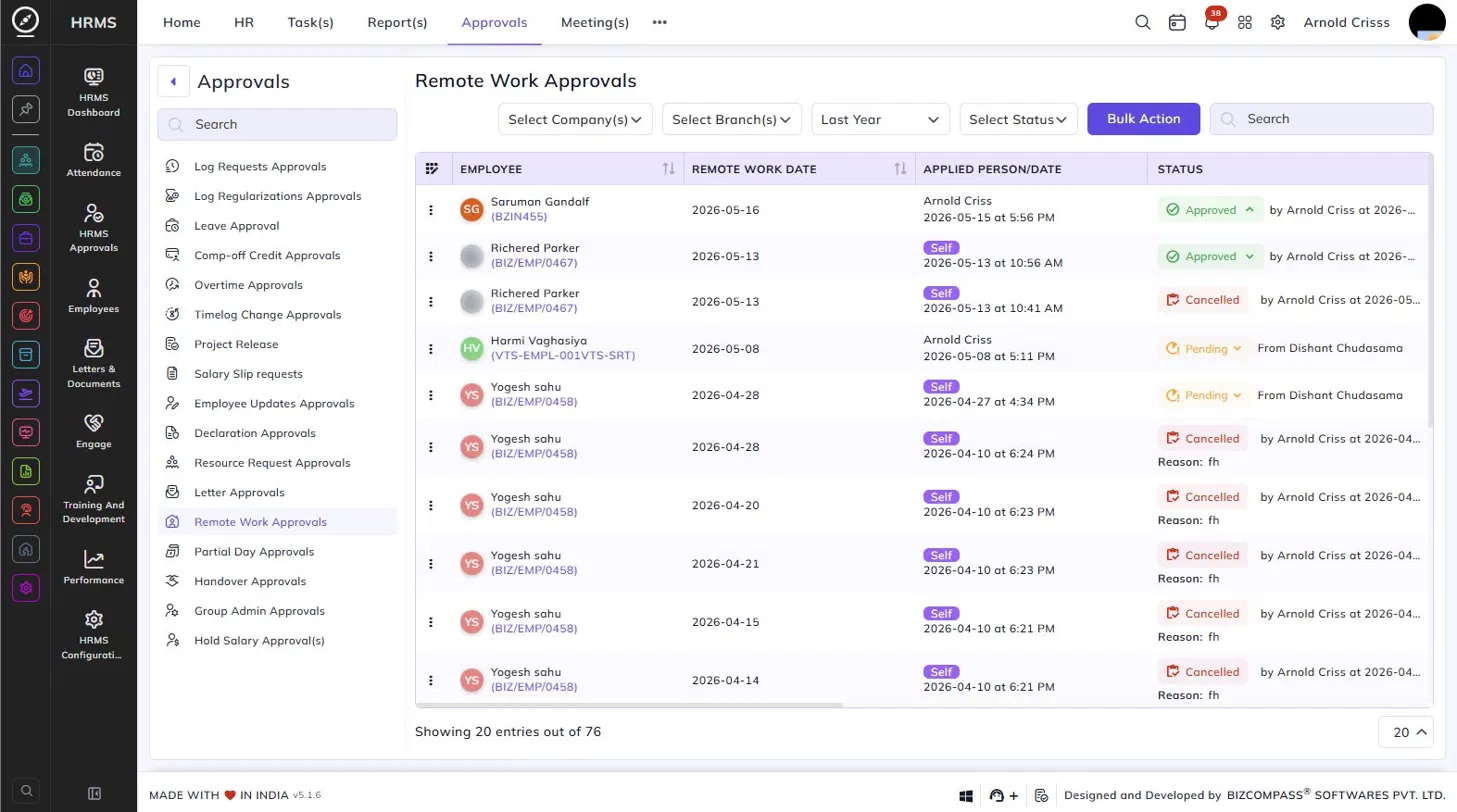
Remote Work Approvals
The Remote Work Approvals page lists all remote work requests submitted by employees. To navigate here, go to:
Approvals->Remote Work Approvals.
Use the Company, Branch, Date, and Status filters to narrow down the list. Click Bulk Action to approve or reject multiple requests at once.
Table Columns:
Each remote work request displays the following details:
- Employee – The employee's name and employee code.
- Remote Work Date – The date for which the remote work was requested.
- Time Type - Time type indicates the total time of requested remote work
- Applied Person / Date – The person who submitted the request and the date and time of submission. A Self tag indicates the employee applied themselves.
- Start Time and End Time - This indicates the start and end time for the remote work if the requested remote work is hourly based.
- Reason - Whichever the reason added while applying the remote work will be visible here.
- Remote Work Type - This indicates the Type of the requested remote work it can be Field Work, Work From Home, On Duty.
- Approval(s) - By clicking this button, the Approval History/Hierarchy is displayed.
- Status – The current status of the request — Approved (with the approver's name and timestamp), Pending (with the source), or Cancelled (with the reason). Click the Pending dropdown to approve or reject the request directly from the list.