
Apply Comp-Off Credits
When an employee works on a week-off or holiday, they can apply for a comp-off credit to have it added to their leave balance.
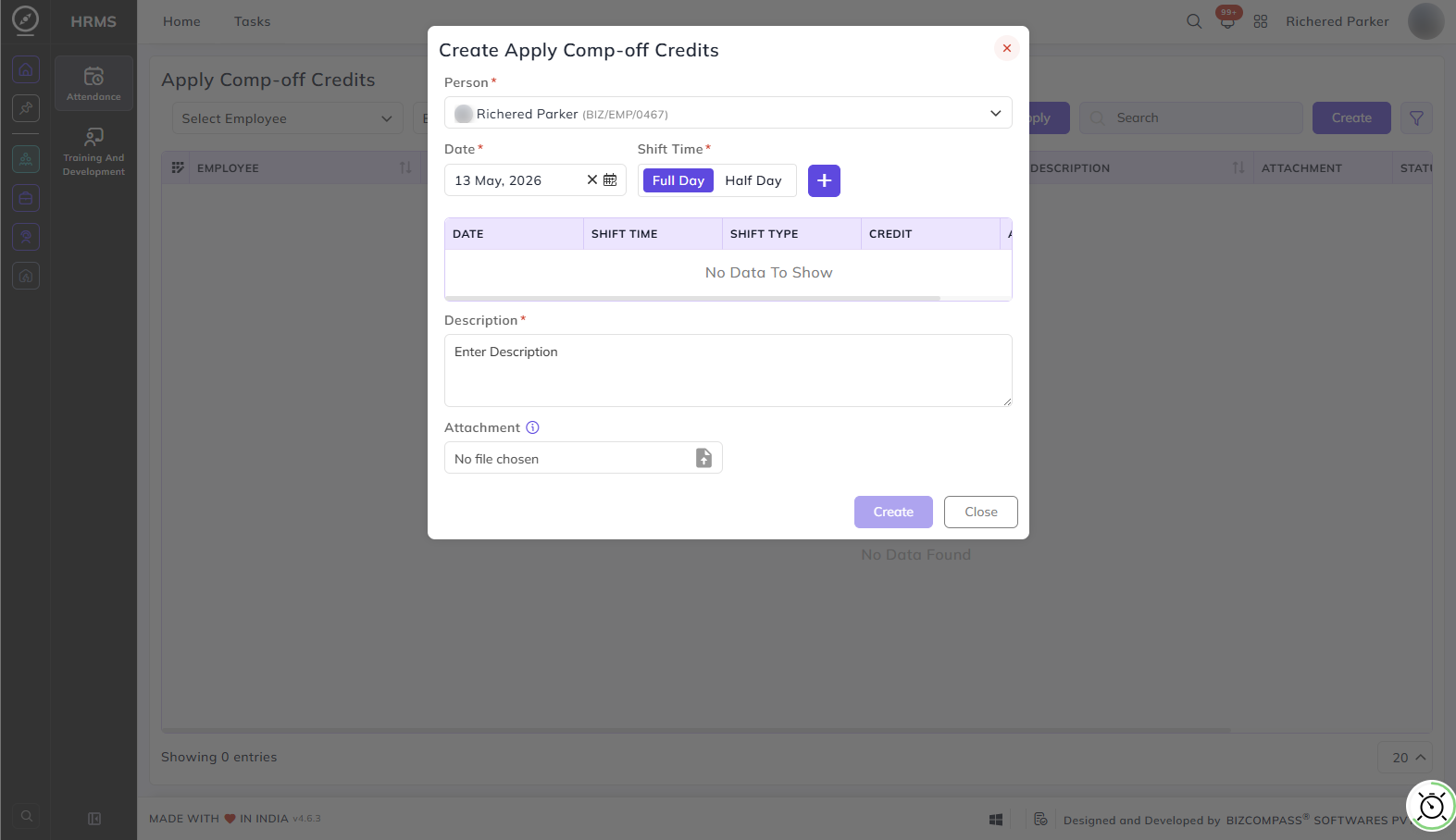
To apply, go to HRMS->Attendance->Apply Comp-off Credits.
Person:
The employee's name is pre-filled. Managers applying on behalf of an employee can select the relevant employee from the dropdown.
Date:
Select the date on which you worked on a non-working day.
Shift Time:
Select whether the work was for a Full Day or Half Day. Click the + button to add the entry to the table. The table will display the date, shift time, shift type, and credit details for the added entry.
Description:
Enter a brief reason or note for the comp-off credit application.
Attachment:
Upload any supporting document if required.
The request will go through the approval process, and once approved, the credit will be added to the employee's compensatory leave balance.
Suppose if a reporting person (or any higher authority person) has "All" rights for Apply Comp-Off Credits page configured in the User Rights, he/ she can apply comp-off credits for all people below him/ her in the user role hierarchy.