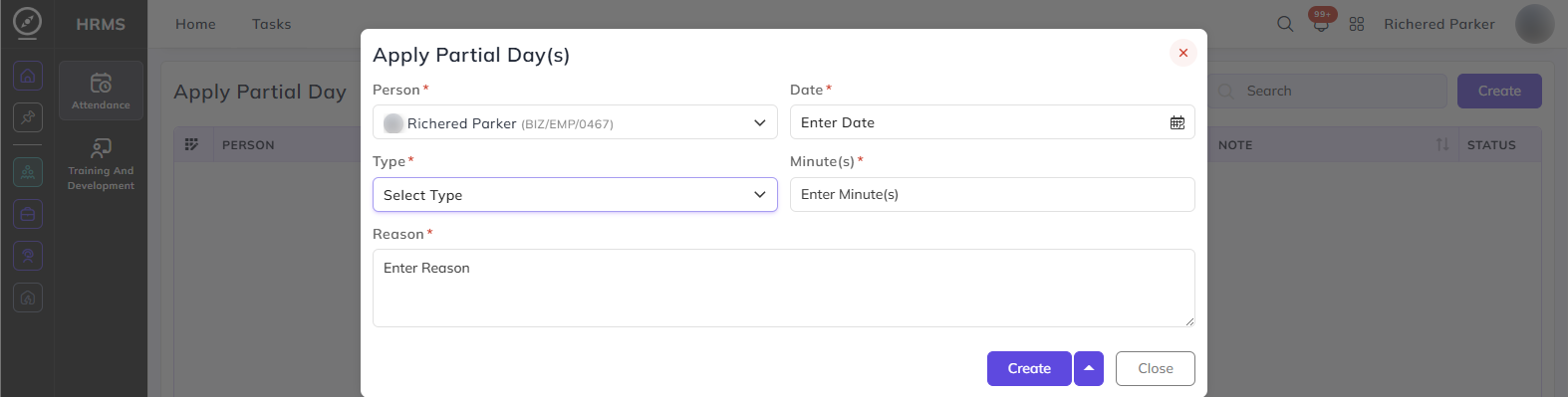
Apply Partial Day
From this page, employees can submit and track their partial day requests. A partial day request allows you to account for situations where you arrived late, left early, or had a short absence during your shift — without receiving a deduction through the daily policy or LOP rules.
Note: Partial Day Policy must be enabled in your attendance policy by your administrator before you can submit requests.
Reason:
Enter the reason for your partial day request.
From Date / To Date:
Set the date range for the partial day request.
Things to keep in mind when applying a Partial Day:
- You can only apply a partial day within the number of times allowed per week or month as defined in your attendance policy.
- If you arrived late, the late minutes must be within the maximum late arrival limit set in your policy. For example, if the limit is 60 minutes, you cannot apply a partial day if you were more than 60 minutes late.
- If you left early, the early departure must be within the maximum early departure limit. For example, if the limit is 30 minutes, leaving more than 30 minutes early means a partial day cannot be applied.
- If you clocked out and clocked back in during your shift, the total absence between those two times must be within the maximum absence limit allowed per request.
- Depending on your policy settings, you may only be able to apply for present or future dates, or you may be allowed to apply for past dates within a certain number of days.
- If your policy requires a reason, you will need to enter one before submitting.