
Leave Policies/ Rules
After creating all Leave Types, the next step is to define Leave Rules. Leave Rules control how many leaves employees receive, when they receive them, how they accumulate, and how unused leaves are handled.
Important:
Loyalty Leave and Company Outside Support Leave do not require Leave Rules.
They are controlled from Employee Master and Organization Settings.
Leave Rules are created only for:
-
Paid Leave (CL, SL, EL, etc.)
-
Unpaid Leave
-
Earned Leave
-
Compensatory Leave
Structure of a Leave Rule:
Each Leave Rule contains:
-
Rule Name
-
One or more Leave Types
-
Credit and frequency logic
-
Carry-forward, lapse, and settlement rules
-
Eligibility controls (probation, interns, restrictions)
Once created, the rule displays all included leave types with their individual configurations.
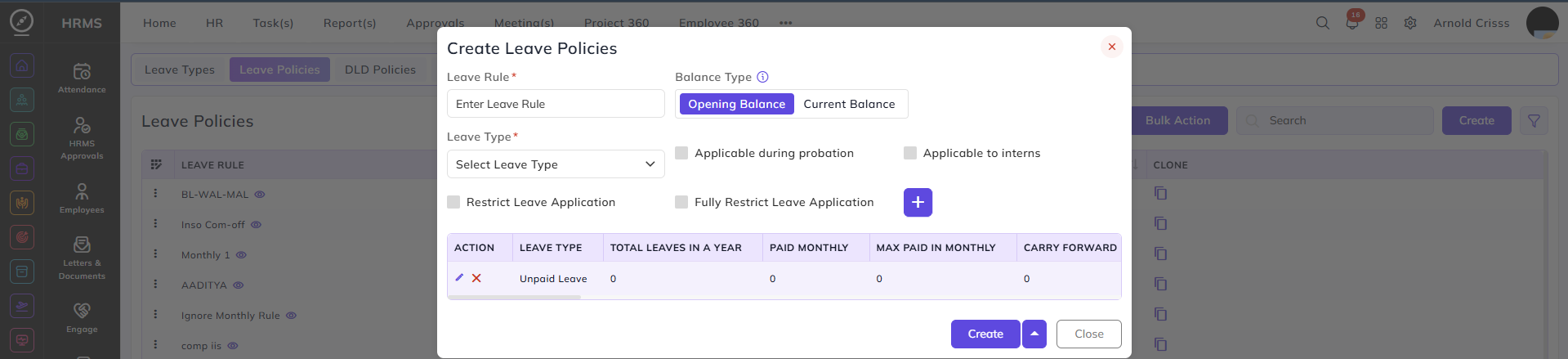
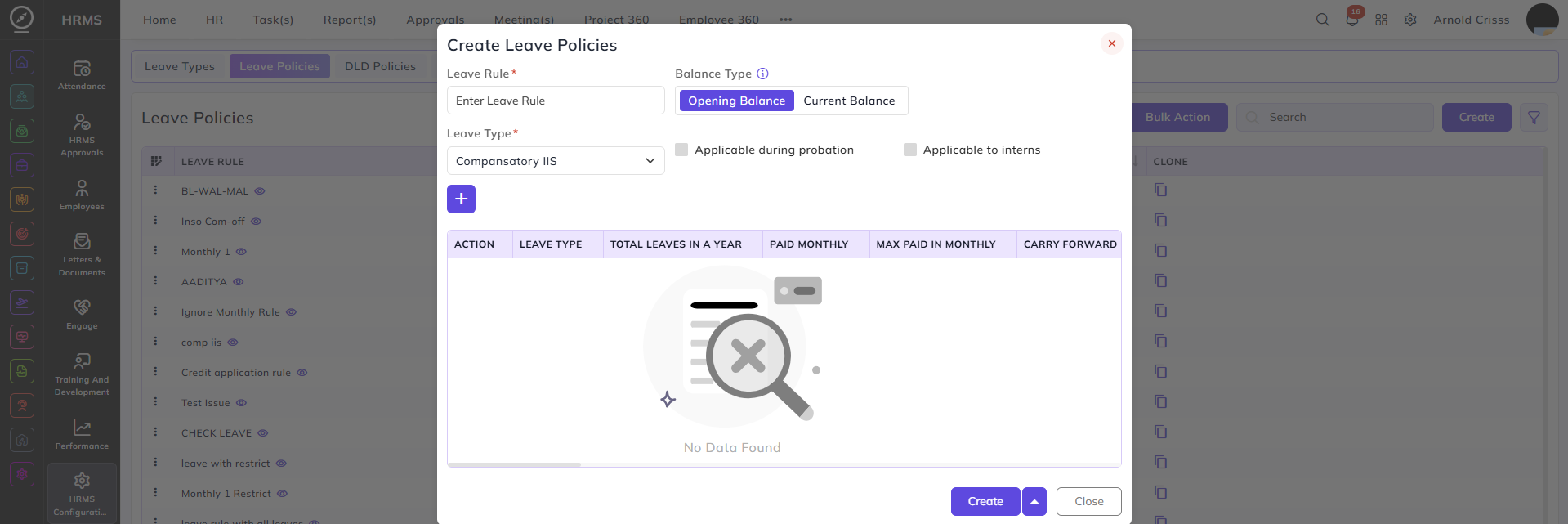
1. Unpaid Leave Rule:
Unpaid Leave does not require credit, balance, or limits.
Configuration:
-
Add Unpaid Leave using ➕
-
No monthly, yearly, probation, or carry-forward settings required.
Behavior:
-
Available when paid leaves are exhausted or not applicable.
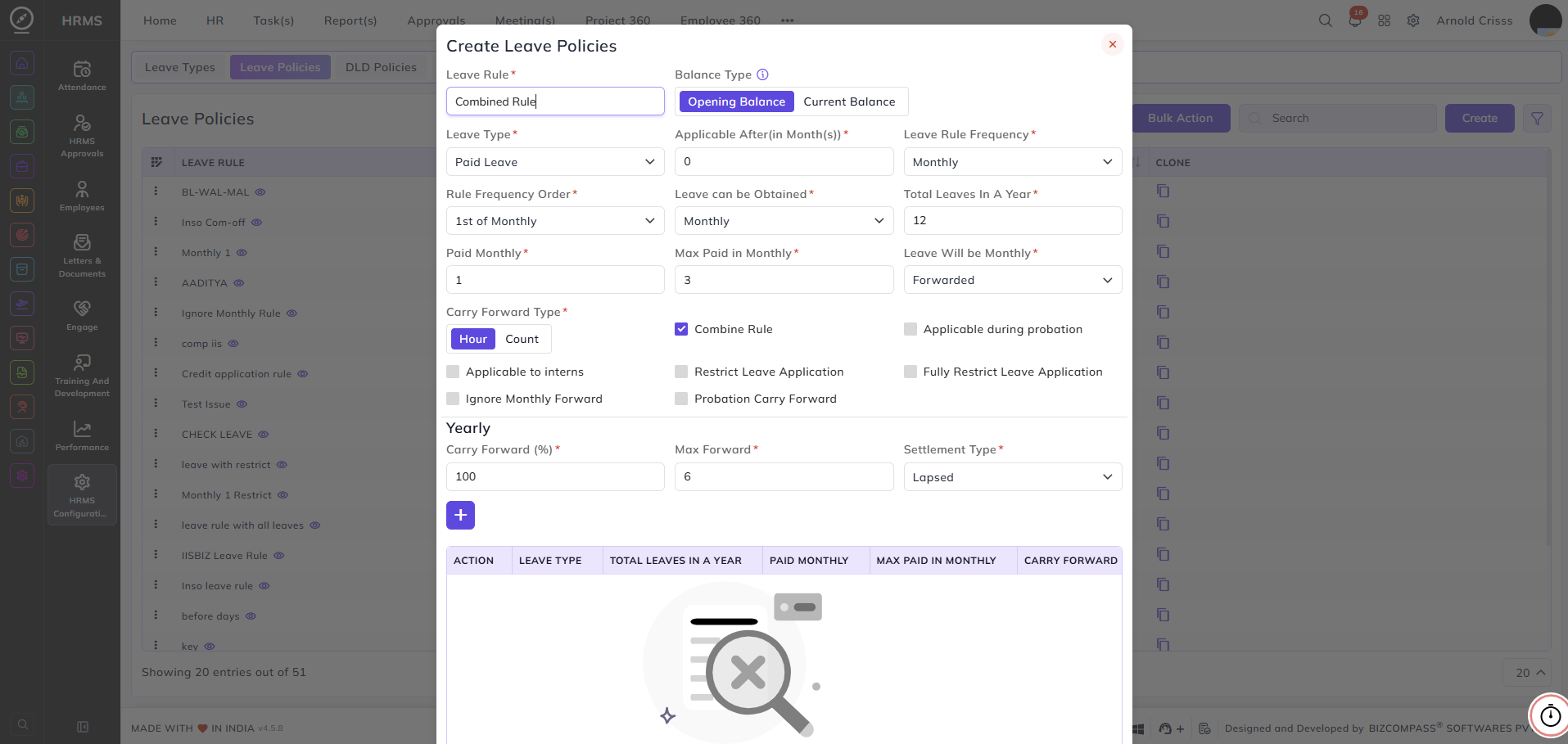
2. Paid Leave Rule (CL, SL, etc.):
Paid Leave defines most leave policies and controls.
Applicable After (Months):
Controls when the leave becomes usable after assignment.
| Value | Availability |
|---|---|
| 0 | From joining date |
| 1 | After 1 month |
| 2 | After 2 months |
Used commonly for confirmation-based eligibility.
Leave Rule Frequency:
Defines how the leave year is divided.
Options:
-
Monthly (12 periods)
-
Quarterly (4 periods)
-
Half-Yearly (2 periods)
-
Yearly (1 period)
Each period follows its own credit and carry-forward logic.
Leave Can Be Obtained:
Defines how often leave is credited within the rule frequency.
Example:
-
Rule Frequency: Yearly
-
Credit Frequency: Monthly OR Quarterly
-
Result: Annual leaves are credited month by month
Total Leaves in a Year:
Total number of paid leaves an employee receives annually.
Example:
-
12 leaves per year
Paid in Monthly:
Number of leaves credited per month.
Example:
-
12 yearly → 1 per month
Max Paid in Monthly / Quarterly:
Limits the maximum leaves usable in a month/quarter.
Example:
-
Balance = 4
-
Max Paid in Monthly = 3
-
Employee can use only 3 that month
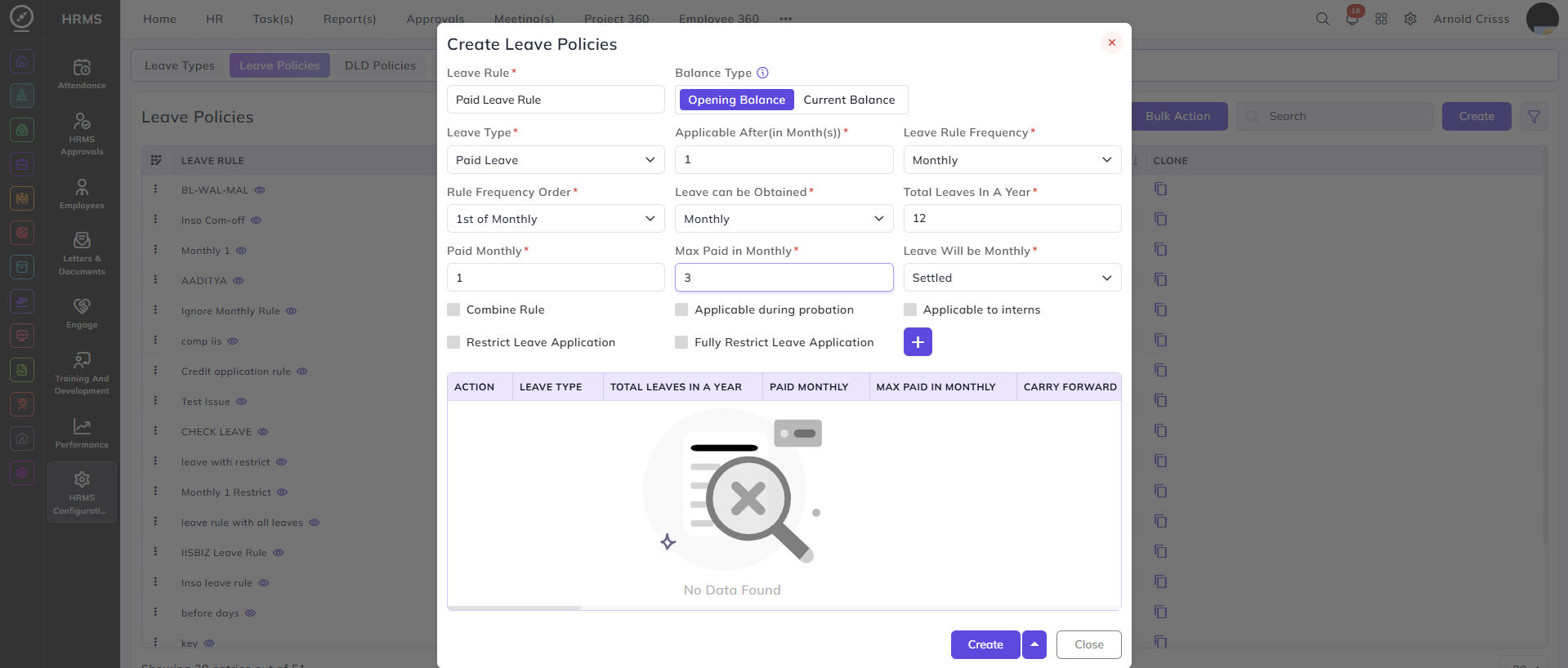
Monthly Forward / Settle / Lapse:
Defines what happens to unused leaves at month end.
Options:
-
Forward
-
Settle
-
Lapse
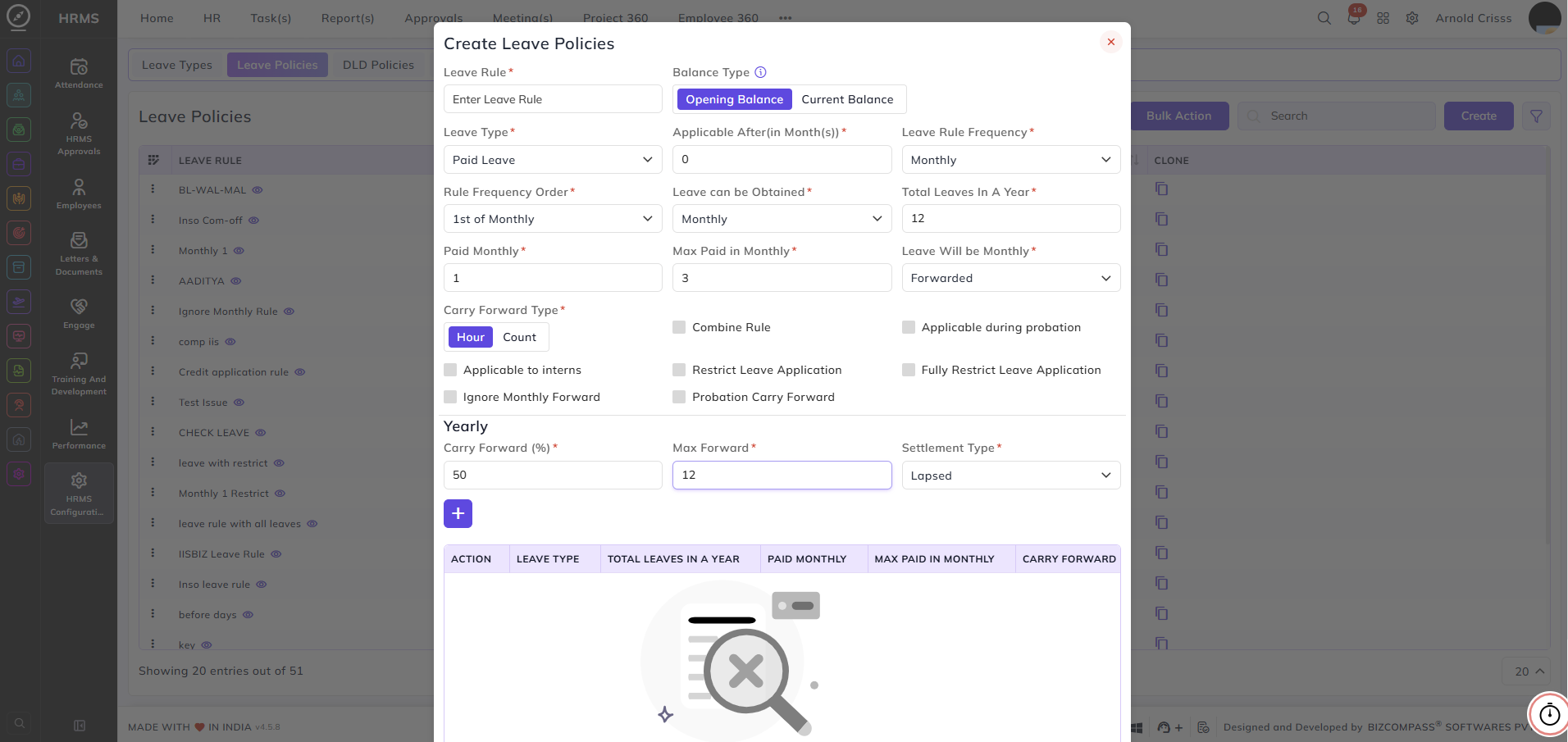
Forward types:
-
Count-based
-
Hour-based
Count vs Hour Forward:
Count-based
-
Carries forward as full-day units
Hour-based
-
Carries forward based on actual shift hours
Count-based is recommended when shift hours change.
Probation and Intern Rules:
Options:
-
Applicable during probation
-
Applicable to interns
If not enabled, those employees will not receive paid leave.
Restrict Leave Application:
If paid leave balance is exhausted:
Ignore Monthly Forward:
All yearly leaves are credited upfront based on pro rata.
Example:
-
12 yearly leaves credited at rule start
Probation Carry Forward:
Probation leaves are carried forward after probation ends in simple after the probation based on pro rata the leaves will be credited.
Yearly Carry Forward:
At year-end:
-
Carry forward percentage can be defined
-
Maximum cap can be applied
Example:
-
50% carry forward
-
Max 12 leaves
3. Earned Leave (EL):
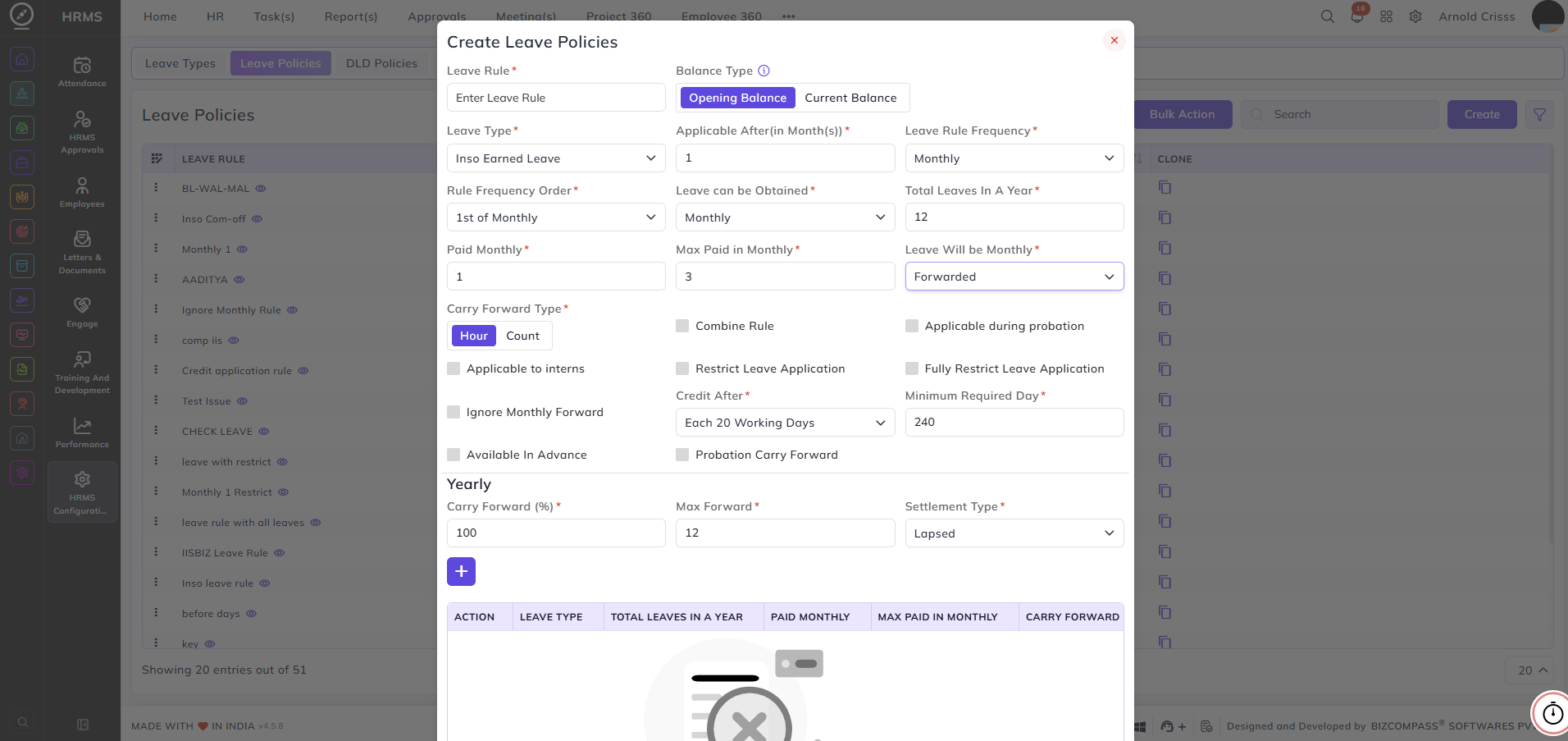
Earned Leave is based on work completed.
Additional settings:
Credit After:
Earn EL based on:
-
Every X working days
-
Monthly
Example:
-
1 EL per 20 working days
-
OR 1 EL per month
Minimum Required Days:
Minimum working days required before EL starts.
Example:
-
240 days mandatory
Option:
-
Available in Advance bypasses this rule
4. Compensatory Leave:
Eligibility rules are defined in Leave Type.
In Leave Rule:
-
Only enable the leave
-
No credit, carry-forward, or frequency required
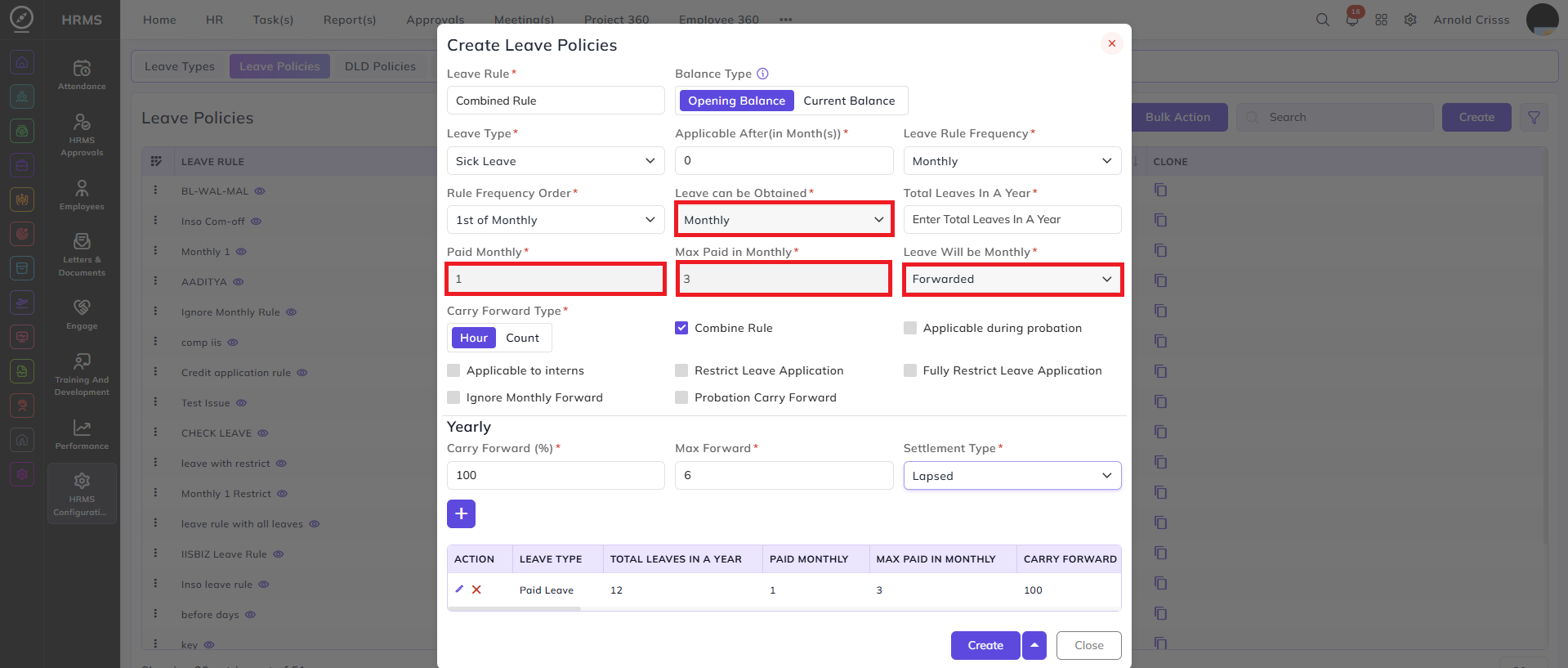
5. Combined Leave Rule (CL + SL)
Used when multiple leave types share a common pool.
Example:
-
Total Paid Leave = 12
-
CL = 6
-
SL = 6
Behavior:
-
CL is fully configured
-
SL draws from the same yearly pool
Once you enable the Combine Rule option, the squared fields will be automatically filled based on the Paid Leave configuration.
6. Company Outside Support Leave:
Not configured in Leave Rules.
Assigned from:
Employee Master → Settings section

Loyalty Leave — Calculation Logic:
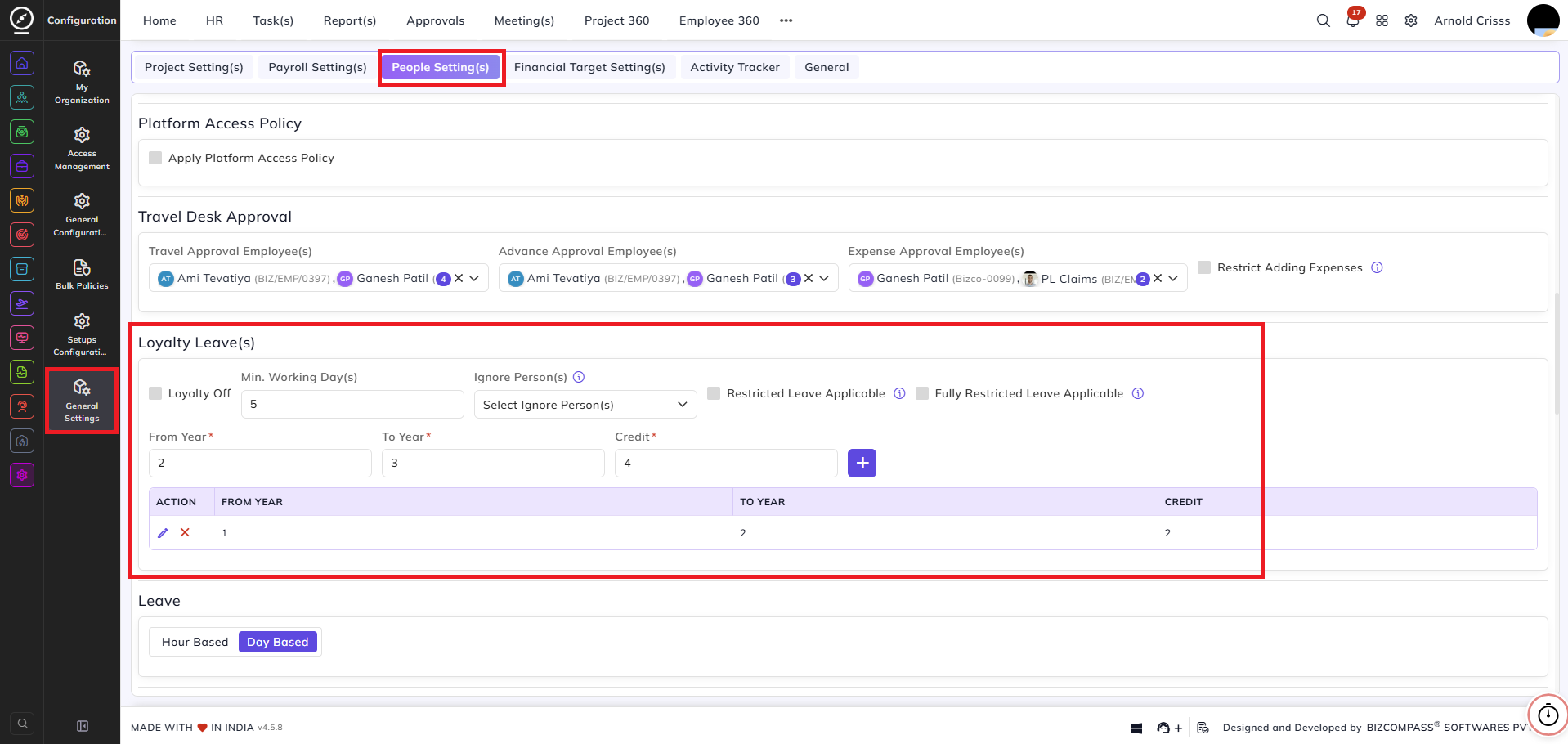
Loyalty Leave can be configured from the People Setting(s) section of the General Settings Page. Loyalty Leave is based on completed service duration, not the current date.
Dates Used:
-
Employee Joining Date
-
Current Date
-
One-Year-Past Date from current date
Loyalty Duration:
Calculated between:
Joining Date → One-Year-Past Date
Current incomplete year is ignored.
Example Calculation:
Current Date: 30-12-2025
One-Year-Past Date: 30-12-2024
Joining Date: 30-12-2023
Loyalty Duration = 1 year
Loyalty Slabs (Configured in Organization Settings):
| Loyalty Duration | Loyalty Leaves |
|---|---|
| 1 year | 2 |
| 2 years | 4 |
| 3 years | 6 |
Loyalty Credit Outcome:
If Loyalty Duration = 1 year → 2 leaves
If Loyalty Duration = 2 years → 4 leaves
If Loyalty Duration = 3 years → 6 leaves
The Bulk Action button allows you to delete multiple leave policies at once, streamlining the management process.
Why One-Year-Past Date Is Used:
-
Ensures only completed service is counted
-
Avoids partial-year inflation
-
Keeps loyalty calculation stable and accurate
Loyalty Leave can be configured by navigating to Configuration->General Settings->People Setting(s) and scrolling down to Loyalty Leave(s).
Final Outcome:
After configuring:
-
Leave Types
-
Leave Rules
-
Loyalty Settings
-
Company Outside Settings
The system automatically manages:
-
Leave eligibility
-
Credit timing
-
Carry-forward and lapses
-
Paid vs unpaid handling
This ensures fully automated, policy-driven leave management across the organization.