
Leave Types
From this page, we can define and configure various Leave Types that employees can apply for. Each leave type controls who can apply, when it can be applied, how it can be used, and what documents are required. Leave types are later linked to Leave Rules, which decide how many leaves are granted.
Common Fields for All Leave Types:
All leave types—Paid, Unpaid, Compensatory, Loyalty, and Company Outside—share the same base configuration.
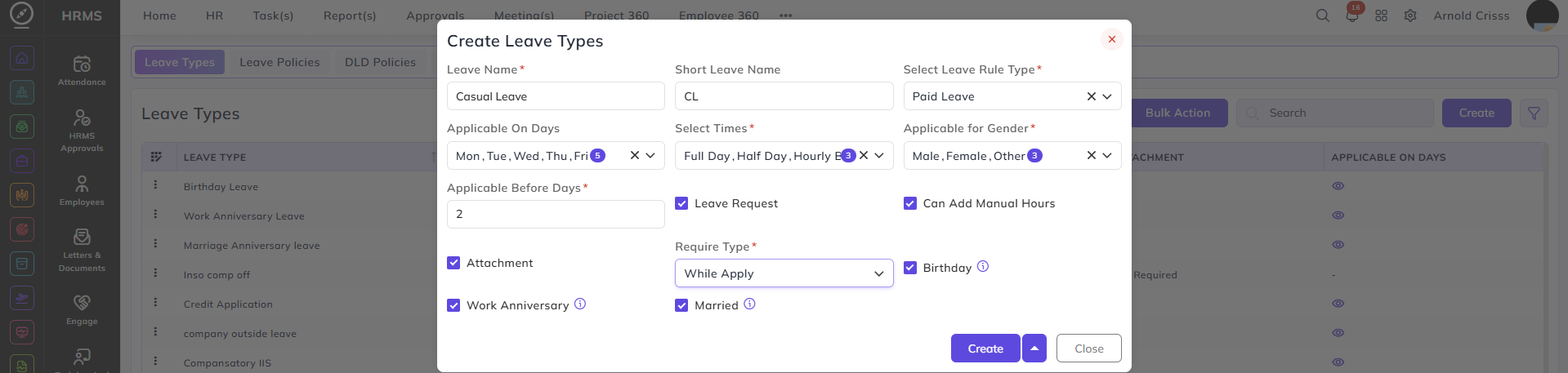
Leave Type Name:
The full name of the leave.
Example: Casual Leave, Sick Leave, Earned Leave, Compensatory Leave
Short Leave Name:
A shorter display name used in screens and reports.
Example: CL
Applicable On Days:
Defines the days on which this leave can be applied:
-
Working days
-
Week offs
-
Holidays
-
All days
This controls whether leave can be applied on non-working days.
Leave Duration Type:
Defines how the leave can be taken:
-
Full Day
-
Half Day
-
Hourly
Multiple options can be enabled.
Example: Sick Leave may allow Full Day and Half Day, while Permission Leave may allow Hourly.
Applicable for Gender:
Restricts the leave to:
-
Male
-
Female
-
All
Used for gender-specific leaves such as maternity or paternity leave.
Applicable Before Days:
Controls how early or late a leave can be applied.
This setting determines which dates are selectable while applying leave.
| Value | Allowed Leave Dates |
|---|---|
| 0 | Past, present, and future dates |
| 1 | From today onwards |
| 2 | From tomorrow onwards |
| 3 | From day after tomorrow onwards |
This prevents back-dated or same-day leave applications if advance notice is required.
Is Leave Request Based:
-
Enabled: Leave requires approval from the reporting manager
-
Disabled: Leave is auto-approved
Allow Manual Hours:
Applicable when Hourly leave is enabled.
Attachment:
Defines whether documents are required.
Options:
-
While Applying
-
Before Approval
-
Not Required
Commonly used for Sick Leave, Medical Leave, or Accident Leave.
Birthday:
Enabling this option will make the leave applicable when its employee's birthday.
Work Anniversary:
Enabling this option will make the leave applicable when its employee's work anniversary.
Married:
Enabling this option will make the leave applicable for employees who are married.
Leave Type Categories:
Paid Leave:
Used for salary-paid leaves such as:
-
Casual Leave
-
Sick Leave
Salary is not deducted.
Unpaid Leave:
Same configuration as Paid Leave, but salary is deducted or not get paid for that leave.
Earned-Leave:
Used for special exception or non-working leave types. Configuration is the same as Paid Leave Type.
Loyalty Leave:
Used as a reward for long-term service. Configuration is the same as Paid Leave. Entitlement is defined in Leave Rules.
Company Outside Leave:
Used when employees are officially working outside the organization. Configuration is the same as Paid Leave.
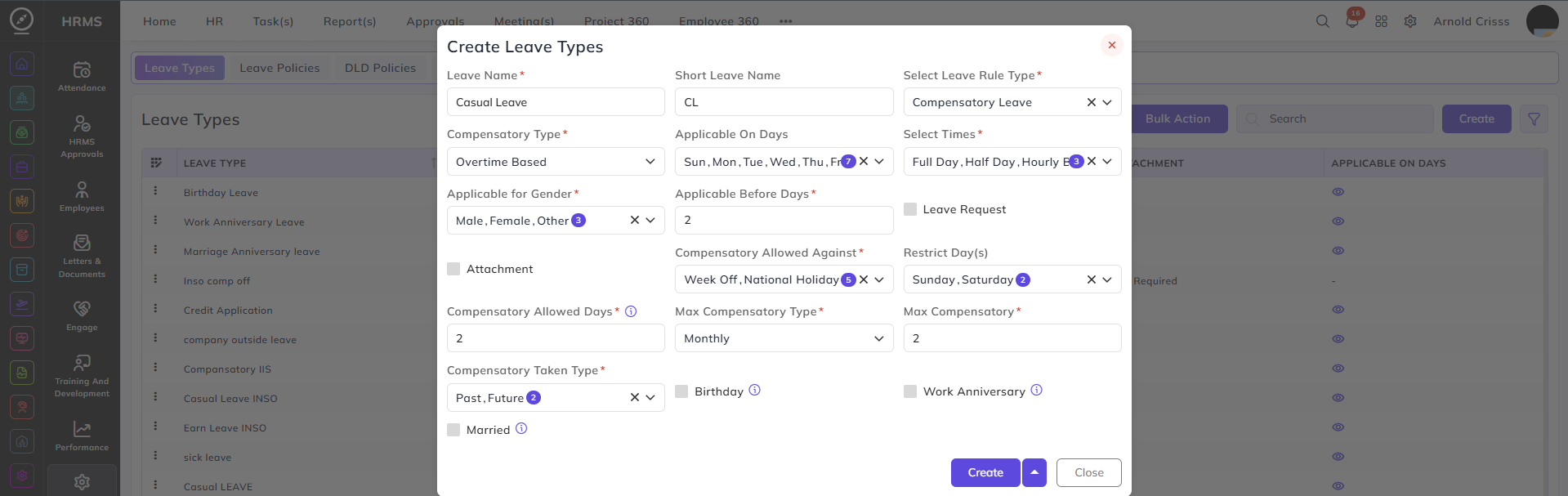
Compensatory Leave (Special Configuration):
Compensatory Leave is earned when employees work extra and receive leave in return.
Compensatory Type:
Defines the compensatory types:
- Overtime Based
- Credit Based
Compensatory Allowed Against:
Defines when compensatory leave can be generated:
-
Daily overtime
-
Week offs
-
National holidays
-
Festival holidays
Restrict Days:
Prevents compensatory generation on selected days
(e.g., Sunday or Saturday).
Compensatory Allowed Days:
Defines how long the compensatory leave remains valid.
Example: 30 days validity.
Max Compensatory:
Defines the maximum number of compensatory leaves allowed.
Limits can be set:
-
Weekly
-
Monthly
Example: Maximum 2 compensatory leaves per month.
Compensatory Taken Type:
Defines when compensatory leave is created:
-
Past work (already completed)
-
Future planned work
The Bulk Action button allows you to delete multiple leave types at once, streamlining the management process.
Linking Leave Types to Leave Rules:
Creating a leave type only defines how the leave behaves.
It does not allocate leave to employees.
Leave types must be assigned in Leave Rules, where:
-
Monthly or yearly entitlement is defined
-
Carry-forward, encashment, expiry, and limits are configured
Only after this step can employees receive and use the leave.
This structure ensures all leave types are managed with clear eligibility, timing, approval, and documentation rules across the organization.