
Bonus
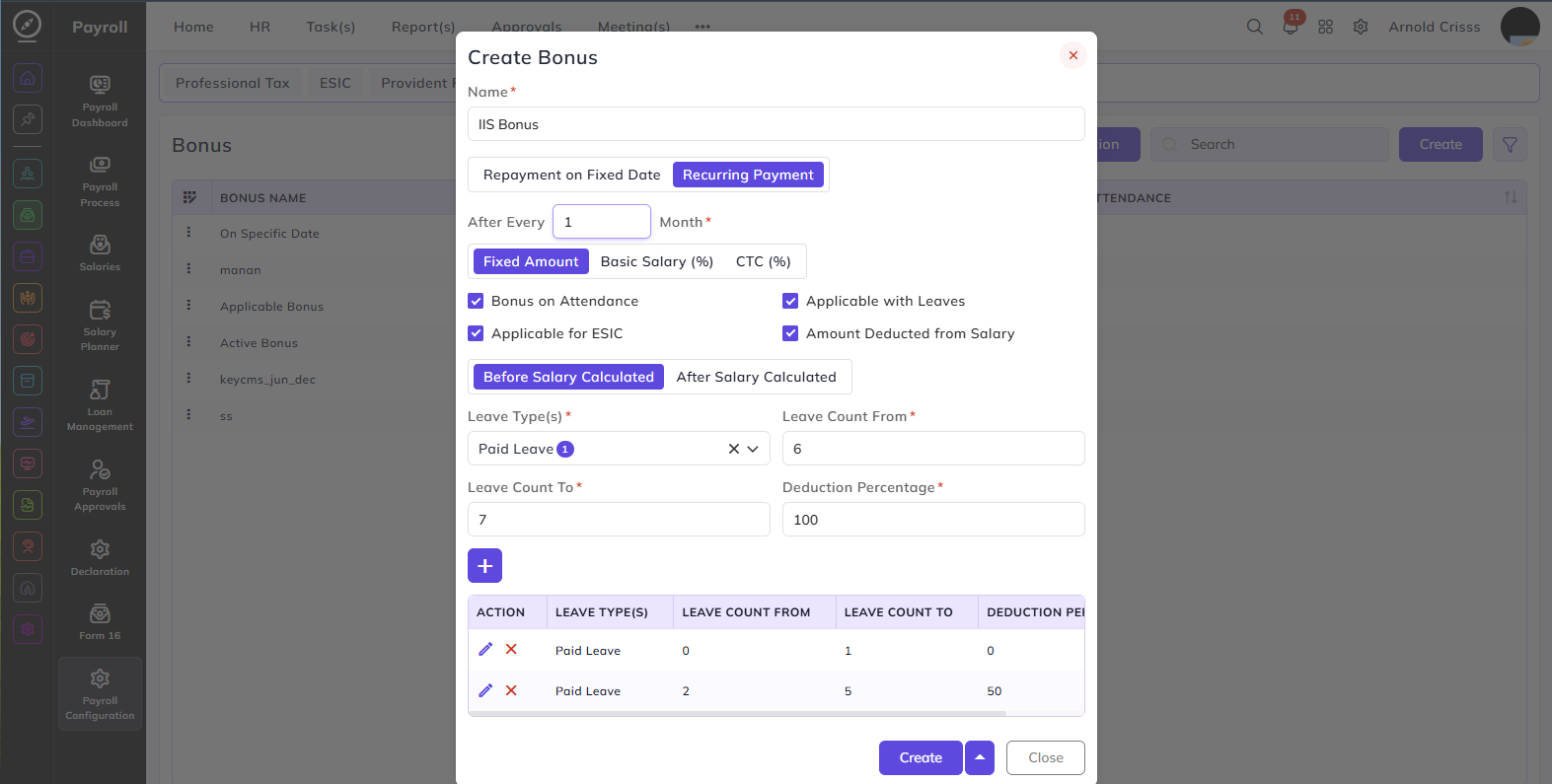
From this page, you can create Bonus configurations for payroll processing.
Name:
Enter a name to identify this bonus configuration.
Payment Type:
Select how the bonus is paid:
Repayment on Fixed Date: The bonus is paid on the specific fixed starting date that is configured in the Employee Management page of the employee.
Recurring Payment: The bonus is paid repeatedly at a defined interval. When selected, the following field appear:
After Every: Enter the number of months after which the bonus recurs — for example, 1 means the bonus is paid every month.
Bonus Amount Type:
Select how the bonus amount is calculated:
- Fixed Amount — a fixed amount is paid as bonus
- Basic Salary (%) — bonus is calculated as a percentage of the employee's basic salary
- CTC (%) — bonus is calculated as a percentage of the employee's CTC
Additional Settings:
Bonus on Attendance:
When enabled, the bonus amount is adjusted based on the employee's attendance. For e.g., the company is providing Rs. 30 as bonus and there are 30 days in the month. Now, if the employee is absent for 5 days, then Rs. 5 will be deducted from the bonus as well.
Applicable with Leaves:
When enabled, the bonus is applicable even when the employee has taken leaves.
Leave Deduction Configuration:
This section defines how leaves affect the bonus amount. Configure the following fields and click + to add an entry to the table:
Leave Type(s): Select the leave type(s) for which the deduction rule applies — for example, Paid Leave.
Leave Count From: Enter the minimum number of leaves from which this deduction rule applies.
Leave Count To: Enter the maximum number of leaves up to which this deduction rule applies.
Deduction Percentage: Enter the percentage of bonus to be deducted when the employee's leave count falls within the defined range.You can add multiple rules to cover different leave ranges with different deduction percentages.
Applicable for ESIC:
When enabled, the bonus amount is included in the ESIC calculation.
Amount Deducted from Salary:
When enabled, the bonus amount is considered in the employee's CTC.
Salary Calculation Order:
Select when the bonus is applied in the payroll calculation:
- Before Salary Calculated — the bonus is applied before the salary is calculated
- After Salary Calculated — the bonus is applied after the salary is calculated
The Bulk Action button allows you to delete multiple bonuses at once, streamlining the management process.