
Minimum Wages
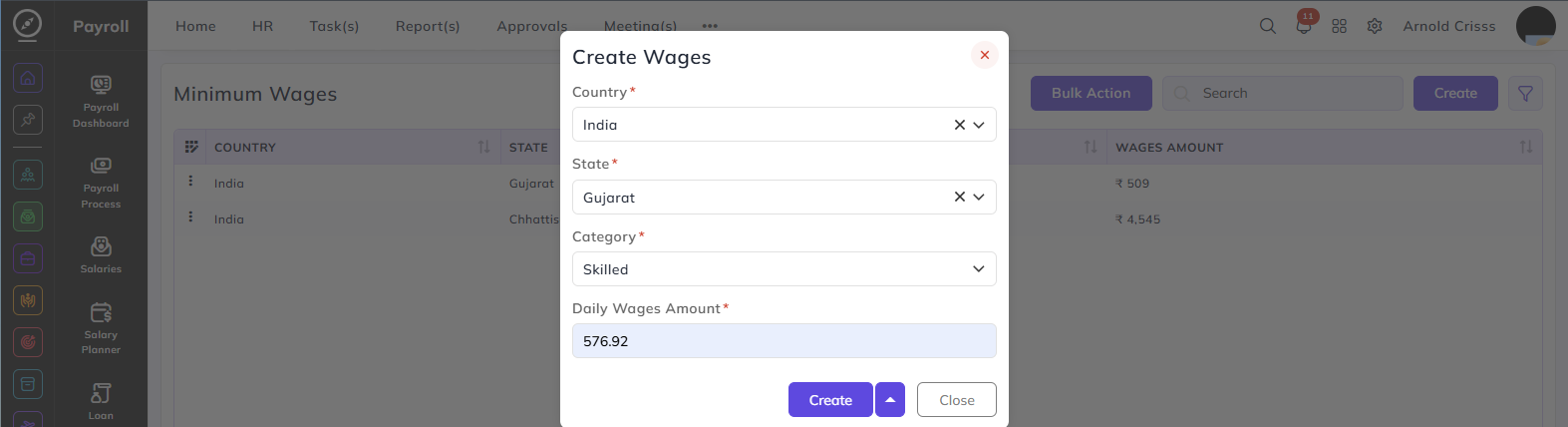
From this page, you can create Minimum Wage configurations based on location and employee category.
Country:
Select the country for which this wage configuration is applicable.
State:
Select the state within the chosen country. Minimum wage amounts vary by state.
Category:
Select the employee category for which this wage applies:
- Skilled — employees with specialized skills or technical expertise
- Semi-Skilled — employees with moderate skills requiring some training
- Unskilled — employees performing basic tasks requiring no specialized skills
Daily Wages Amount:
Enter the minimum daily wage amount applicable for the selected state and category.
The Bulk Action button allows you to delete multiple wages at once, streamlining the management process.