
Professional Tax (PT)
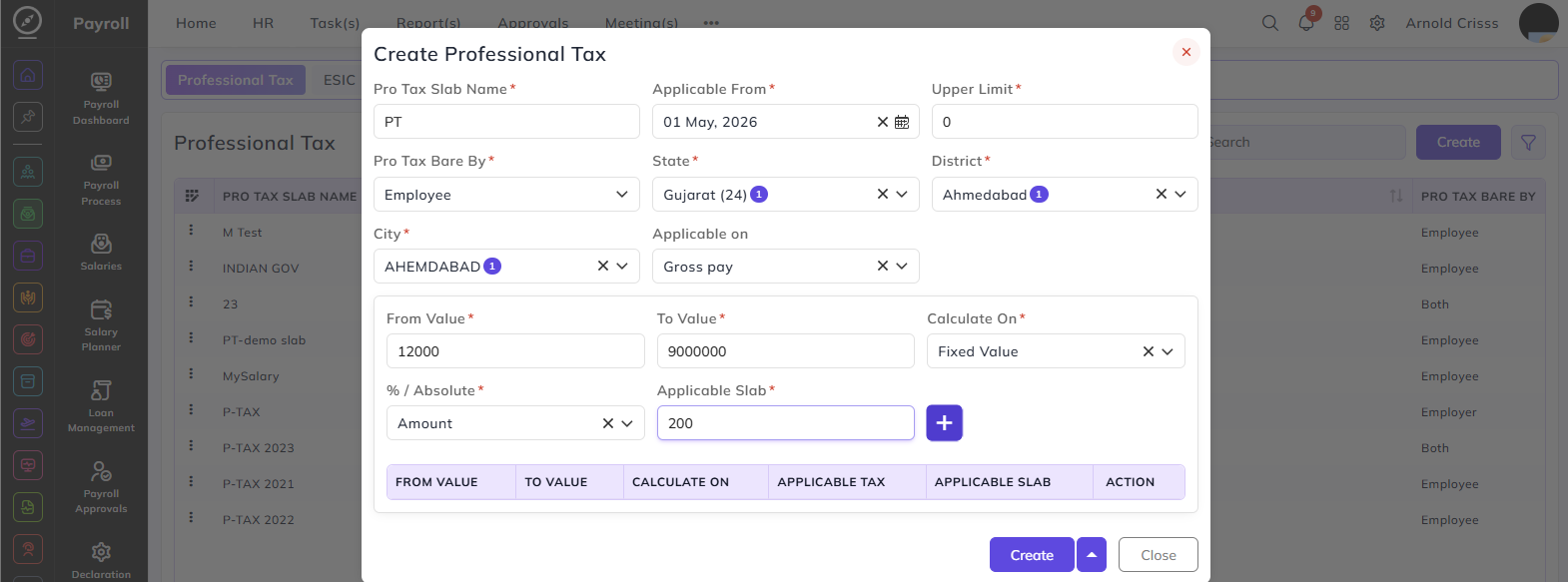
From this page, you can create the Professional Tax Slabs.
Pro Tax Slab Name:
Enter a name to identify this professional tax slab.
Applicable From:
Select the date from which this tax slab will be effective.
Upper Limit:
Enter the upper salary limit for this slab. This defines the maximum salary amount upbelow which tax will not be deducted.
usually we can add this as 0 because we can configure the tax deduction under the from value and to whichvalue thisof slabthe applies.salary below this.
Pro Tax Bare By:
Defines who bears the professional tax. Select one of the following:
- Employee
- Employer
- Both
State:
Select the state for which this professional tax slab is applicable. Professional tax rules vary by state in India.
District:
Select the district within the chosen state.
City:
Select the city within the chosen district.
Note: The location specified in this part should also be defined previously in the Branch page. That branch would be assigned to the employee as a payroll branch.
Applicable On:
Select when the professional tax is applicable:
- Gross Pay
- Net Pay
Tax Slab Configuration:
This section defines the salary ranges and their corresponding tax amounts. You can add multiple slabs using the + button.
From Value:
Enter the minimum salary amount for this slab range.
To Value:
Enter the maximum salary amount for this slab range.
Calculate On:
Select the salary component on which the tax will be calculated:
ActualActual(Gross Salary)- Basic
- Fixed Value
- Upper Limit
% / Absolute:
Define whether the tax amount is a percentage of salary or a fixed amount.
- Percentage(%) — tax is calculated as a percentage of the salary
- Amount — tax is a fixed amount regardless of the exact salary within the range
Applicable Slab:
Enter the tax amount applicable for this salary range.
Click + to add the slab to the table below. You can add as many slabs as needed to cover the full salary range.
The Bulk Action button allows you to delete multiple professional taxes at once, streamlining the management process.