Project Alert Templates
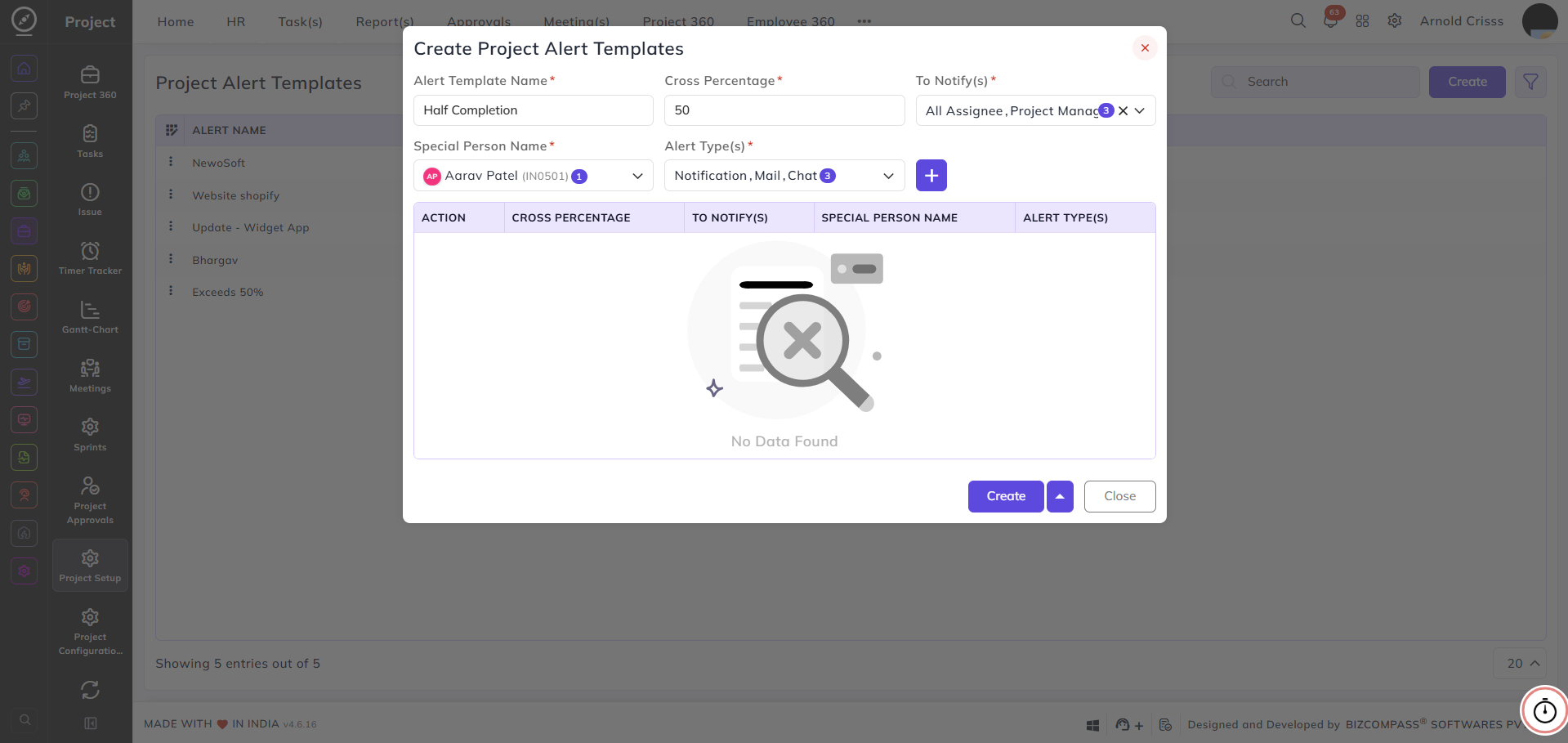
From this page, you can create and manage alert templates that define when and how notifications are sent when project task estimations are crossed by a certain percentage. These templates help keep the relevant team members informed when task progress deviates from the planned estimate.
The alert templates configured here can be applied to projects to automatically notify the relevant people when task estimations are exceeded.
Alert Template Name:
Enter a name to identify this alert template — for example, Exceeds 50%.
Cross Percentage:
Enter the percentage threshold at which the alert should be triggered — for example, 50 to send an alert when a task's logged time exceeds 50% of its estimated time.
To Notify(s):
Select who should be notified when the threshold is crossed — All Assignee, Project Manager, or Special Selected (to notify a specific person).
Special Person Name:
This field appears only when Special Selected is chosen in the To Notify(s) field. Select the specific person(s) who should receive the alert from the dropdown. You can search for users by name or employee ID.
Alert Type(s):
Select the channel(s) through which the alert should be sent — Notification, Mail, or Chat.