Project Modules
Project Modules:
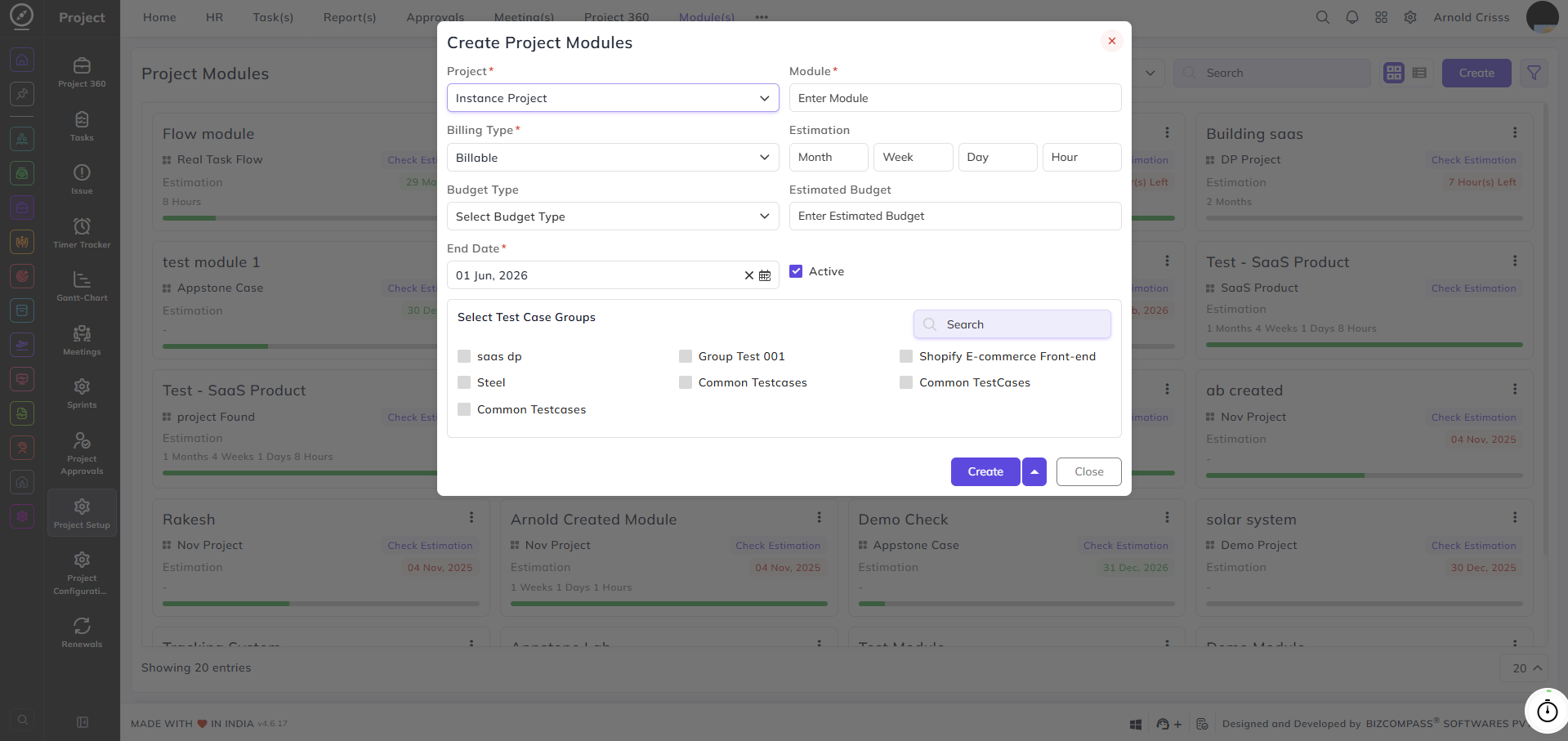
From this page, you can create and manage modules within your projects. Modules help break down a project into smaller, trackable components — each with its own estimation, billing type, budget, and test case groups.
The modules created here break the project into manageable sections, each with its own estimation, billing, and test case assignments.
Project:
Select the project this module belongs to.
Module:
Enter the name of the module.
Billing Type:
Select whether this module is Billable or Non-Billable.
Estimation:
Enter the estimated time for this module broken down into Month, Week, Day, and Hour.
Budget Type:
Select the budget type (Amount or Percentage (%)) for this module.
Estimated Budget:
Enter the estimated budget amount for this module.
End Date:
Select the end date for this module.
Active:
Enable this checkbox to mark the module as active.
Select Test Case Groups:
Select the test case groups to be associated with this module. Multiple groups can be selected.