
Email Templates (Recruitment)
The Email Templates page allows you to manage various email templates required during the recruitment process. You can create email templates for different stages of recruitment, like sending appointment letters, policy emails, or even online interview emails.
Email Templates are generally used while designing the interview and joining procedure flows.
Create an Email Template:
-
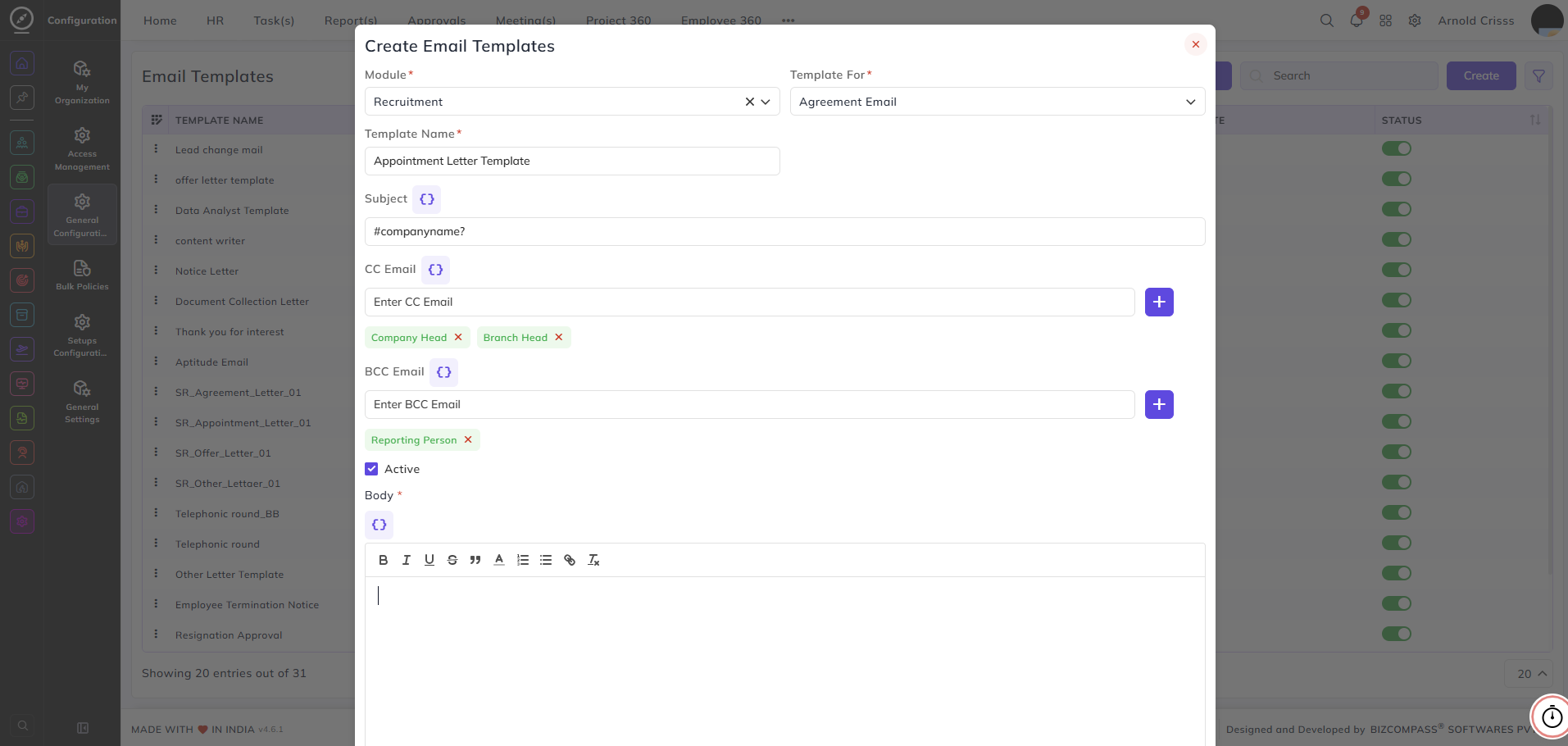
Select the Recruitment Module.
-
Once you select the Module, the Template drop down will have multiple options like Agreement Email, Appointment Letter, etc. Select the relevant option.
-
Enter the Subject for the email. You can also add tags by clicking on the "{ }" button for built in tags like Person Name, Designation, Department, etc.
-
Add the CC Email addresses, if necessary. You can select people from the "{ }" button.
-
Add any BCC Email addresses, if needed. You can select people from the "{ }" button.
-
Write the Body of the email using the built-in text editor. You can format the text, add links, and insert images. You can also add tags by clicking on the "{ }" button for built in tags like Person Name, Designation, Department, etc.
-
Attach any files to the email template, if needed.
-
Ensure that the Active checkbox is checked if you want the template to be available for use.
You can view and manage all your email templates, toggle their status (active or inactive), and use them in relevant recruitment workflows.
The Bulk Action button allows you to delete multiple email templates at once, streamlining the management process.