
Employee Referral Programs
The Employee Referral ProgramPrograms page manages and creates referral programs; if a recruiter-created application selects a referral program based on a reference employee, that employee will receive a referral bonus in salary after the joining of the candidate.
Employees can send a referral link from My Profile using the Refer a Friend button. They can copy the link and share it with candidates.
When a candidate submits the form, it appears in Candidate Inquiry. While adding an application, the recruiter must select the Employee Referral Program: the Primary Source will automatically be the reference employee, and the Secondary Source will be the employee who sent the referral link just need to add Employee Referral Program.
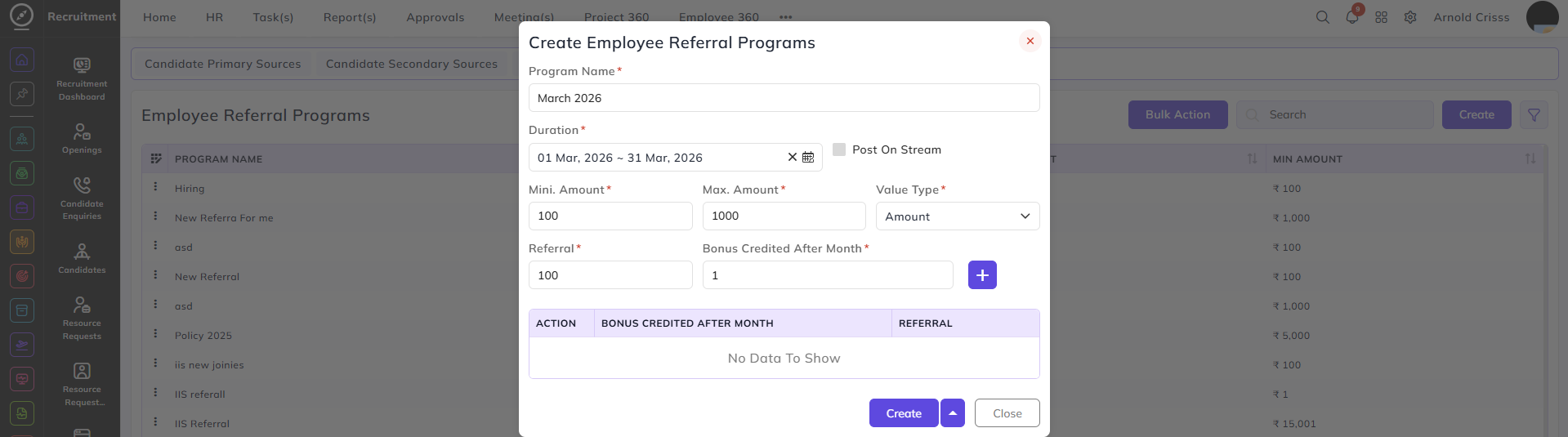
Create Employee Referral Program:Programs:
- Enter the referral Program Name, e.g., "March 2026 Referral Drive".
- Specify the Duration for the program.
- Optionally, enable the Post on Stream option to post the program on the internal stream for visibility.
- Define the Minimum and Maximum Amount the employee will get as a referral bonus.
- Select the Value Type (percentage or amount).
- Enter the amount for a successful Referral.
- Specify the Month(s) when the referral bonus is credited after the joining of a candidate. Multiple entries can be added using the "+" button, e.g., Month 1 – ₹100, Month 3 – ₹300.
With the Bulk Action feature, you can delete multiple employee program referrals at once, streamlining the process of managing and maintaining recruitment process.
This feature is optional; it can be configured only if your company wants to run employee referral programs.