
Interview Procedure Flow
The Interview Procedure Flow feature is used to design, manage, and control the complete interview process for candidates. It allows organizations to define structured interview stages and map them in a logical sequence, ensuring a consistent and transparent hiring workflow.
This flow helps recruiters visualize and manage how a candidate progresses from one interview stage to the next.
Overview:
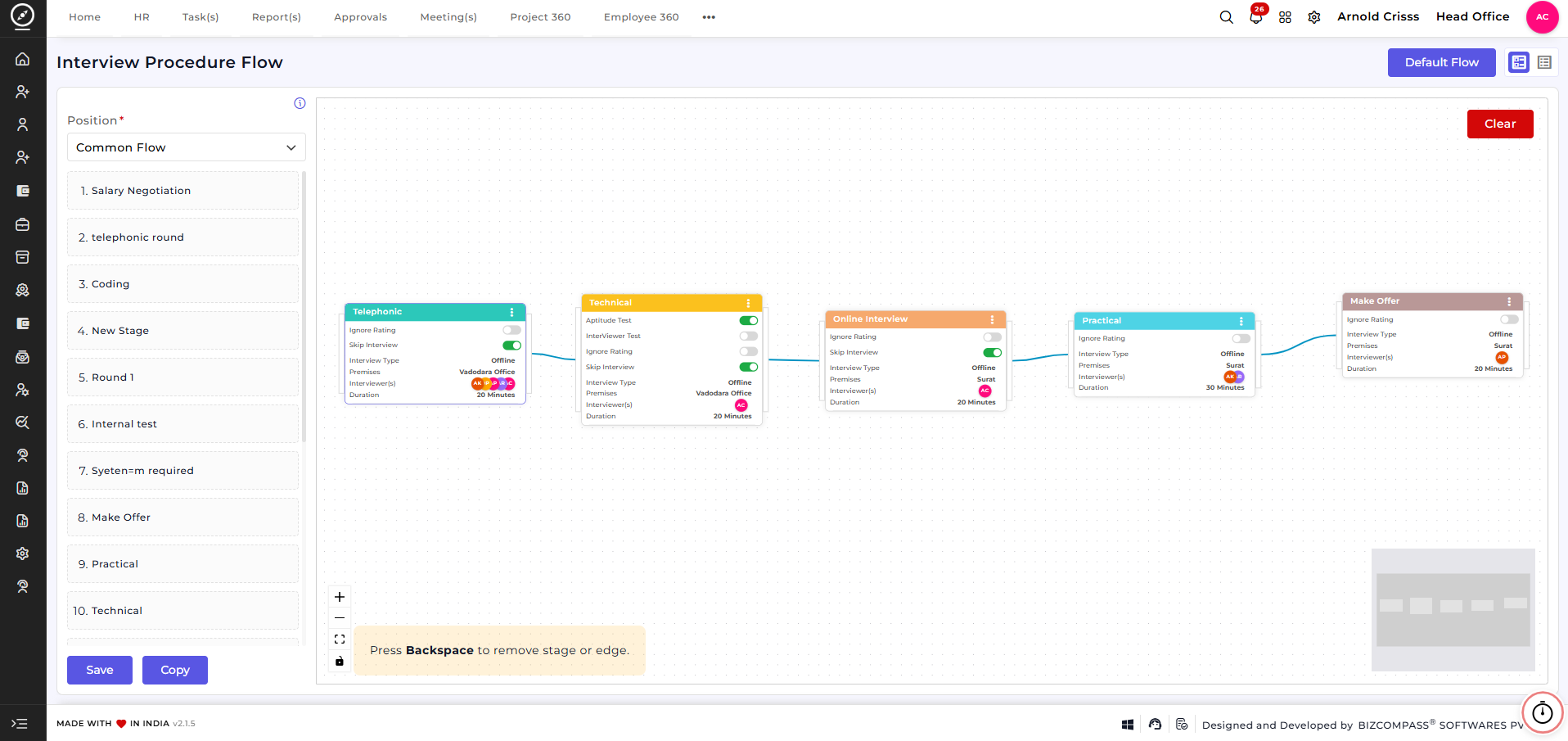
This screen provides a dynamic visual workflow builder where interview stages are arranged in sequence.
-
Select a Position / Flow Type (e.g., Common Flow or role-specific flow).
-
View all available interview stages on the left panel.
-
Drag and arrange stages on the canvas to define the interview order.
-
Connect stages to create a logical interview progression.
-
Use Save to store the flow or Copy to duplicate an existing flow.
-
Use Clear to reset the current flow.
The visual layout helps recruiters quickly understand and manage the entire interview process at a glance.
Interview Stages:
Interview stages represent individual steps in the hiring process. Examples include:
-
Telephonic
-
Technical
-
Online Interview
-
Practical
-
HR Round
-
Salary Negotiation
-
Make Offer
Note:
These interview stages are fully customizable.
Stages can be created and managed from a separate configuration page, allowing organizations to define interview steps based on their hiring needs.
(That configuration page is not exposed here.)
Customizing the Interview Flow:
Using the flow builder, recruiters can:
-
Add or remove interview stages
-
Rearrange stages based on hiring requirements
-
Connect stages to define candidate movement
-
Create different flows for different positions if needed
This ensures flexibility while maintaining a standardized interview structure.
Stage Configuration:
When a user clicks on any stage in the Interview Procedure Flow (for example, Telephonic), a Stage Configuration screen opens. This screen is used to define detailed settings for that specific interview stage.
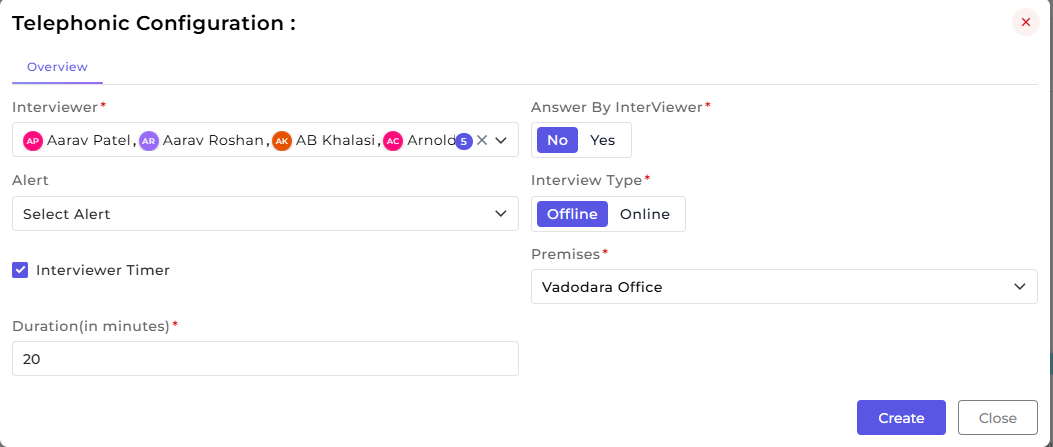
This section allows configuring all essential details for a selected interview stage.
-
Assign one or more Interviewers for the stage. Multiple interviewers can be added to ensure availability and provide backup.
-
Enable or disable Answer by Interviewer based on how the interview should be handled.
-
Select the Interview Type as Online or Offline.
-
For offline interviews, choose the appropriate Premises / Location to ensure clear logistics for both candidates and interviewers.
-
Configure Alerts to notify interviewers about scheduled interviews.
-
Enable the Interviewer Timer to track and control interview duration.
-
Define the Interview Duration (in minutes) to maintain consistent timing across candidates.
-
Click Create to save the stage configuration.
How this feature helps:
The Interview Procedure Flow ensures a structured and efficient interview process. It helps recruiters to:
• Design clear and consistent interview workflows
• Customize interview stages based on hiring needs
• Assign interviewers and define interview logistics
• Maintain transparency across all candidates
• Reduce manual coordination and scheduling errors
This ensures that the entire interview process remains organized, scalable, and aligned with recruitment goals.