
Interview Stages
The Interview Stage page is used to configure the different stages (e.g., telephonic interviews, aptitude test) of the interview process in the recruitment procedure.
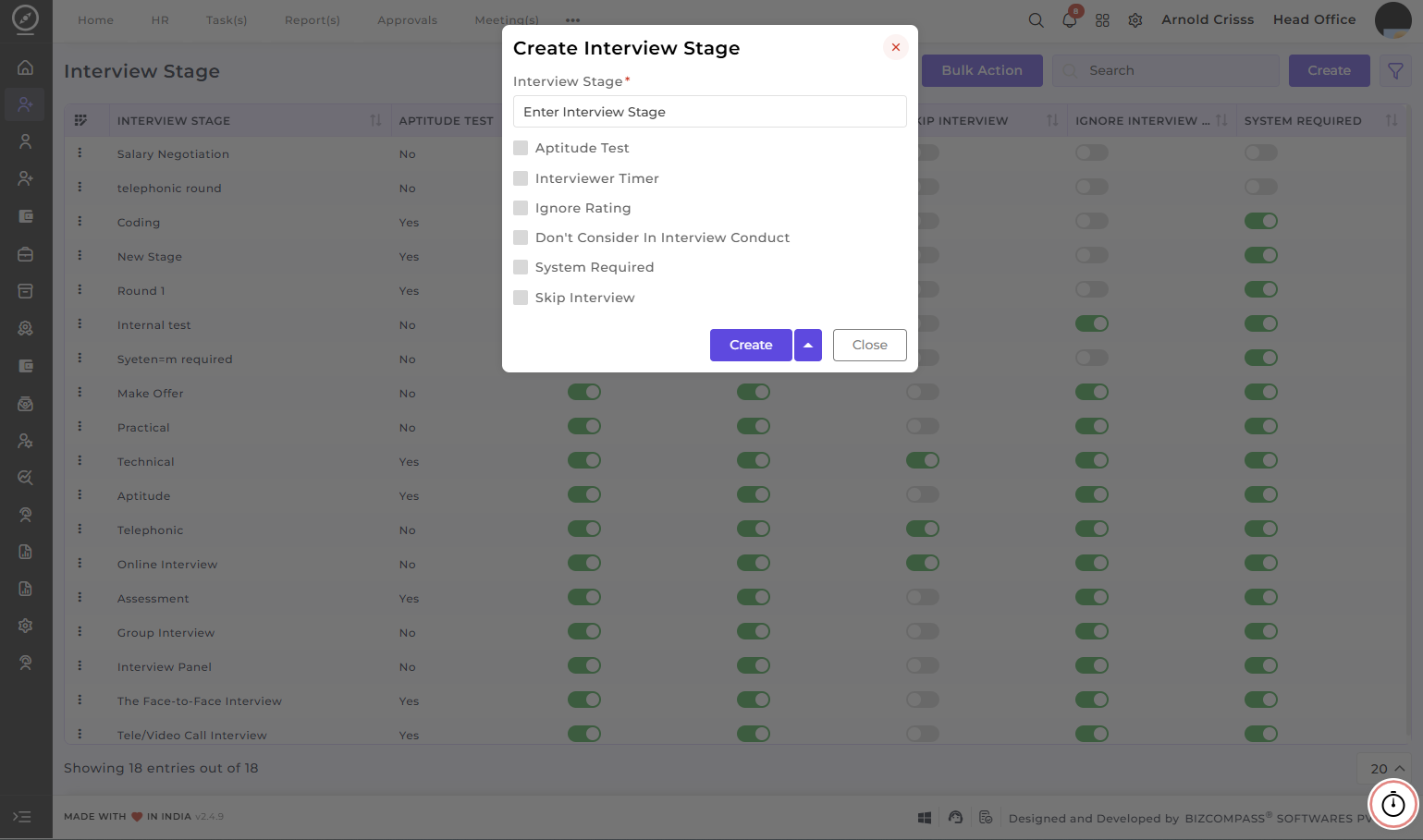
Create Interview Stage:
-
Enter the Interview Stage name.
-
Enable the Aptitude Test option if the stage involves an aptitude test.
-
Choose the Interview Timer option to set a timer for the interview. This is helpful for managing the duration of the interview and ensuring that each candidate is given the appropriate amount of time.
-
Enable the Ignore Rating option if you wish to skip the rating process for this particular interview stage.
-
Enable the Don't Consider in Interview Conduct option if this stage should not be considered when conducting the final evaluation of the candidate.
-
Enable the System Required option if a PC is required for that stage. This option is generally enabled for aptitude or online interview stages.
-
Enable the Skip Interview if you wish to give the option of skipping this stage during the interview procedure flow if needed to the recruiters.
The Bulk Action button allows you to delete multiple interview stages at once, streamlining the management process.
====================================
Interview Stage
The Interview Stage page is used to create and configure interview stages for the recruitment process.
By default, several stages are already provided by the system, such as:
-
Telephonic
-
Aptitude Test
-
Technical
-
Practical
-
Face to Face
These stages represent the different levels through which a candidate can move during the interview process.
For each stage, several configuration options are available, including:
-
Aptitude Test
-
Timer
-
Ignore Rating
-
Skip Interview
-
Ignore Interview Conduct
-
System Required
Each of these options controls how the interview stage behaves during the recruitment workflow.
Aptitude Test
In some interview stages, the organization may require the candidate to complete an aptitude test. In such cases, the Aptitude Test option can be enabled for that stage.
For example, if there is an interview stage specifically for aptitude evaluation, the stage can be updated by enabling the Aptitude Test checkbox.
Once this option is enabled, the system allows the organization to assign a question set to that stage during the Interview Flow setup.
When the interview is scheduled, the system automatically sends the aptitude test link to the candidate at the scheduled time. The candidate receives the link along with their login credentials such as ID and password, allowing them to access and complete the test.
Timer
If the Timer option is enabled, the interviewer can run a timer during the interview stage.
The timer starts when the interview begins and helps track the duration of the interview session. This feature helps maintain consistency and ensures that interviews are conducted within the expected time frame.
Ignore Rating
After completing an interview, the interviewer usually provides feedback and assigns a rating to the candidate.
The rating may be provided in the form of a star rating, such as a five-star scale. Along with the rating, the interviewer may also add comments describing whether the candidate performed well, whether they should proceed to the next round, or whether they should be rejected.
If the Ignore Rating option is enabled, the interviewer will not be required to provide a rating for that stage. The stage can be completed without assigning any rating.
Skip Interview
If the Skip Interview option is enabled, the interview stage can be skipped during the recruitment process.
When scheduling the interview, the recruiter or HR user will have the option to skip that interview stage directly. Even after an interview has been scheduled, it can still be skipped from the main application card of the candidate.
This option is useful when the organization decides that a particular stage is not required for a candidate.
Ignore Interview Conduct
When Ignore Interview Conduct is enabled, the interview stage does not need to be conducted.
This means the candidate can be directly moved to the next stage or selected without performing the interview for that stage. It is useful in situations where the organization decides to bypass a stage entirely.
System Required
The System Required option is used when a particular interview stage requires a computer system or workstation.
For example, in a practical test stage, the candidate may need to use a system to perform coding, technical tasks, or software-related activities.
When System Required is enabled, the system allocates a seat or workstation for the candidate during that stage.
The available systems are fetched from the Asset Management module, where seats and systems have already been created.
During scheduling, the system checks the vacancy of available seats.
Example:
If the organization has six total systems, and four are already occupied by employees, then two systems remain vacant.
These vacant systems appear as available seats for interview allocation.
If employees who are assigned to those seats have not yet clocked in, the system may still display those seats as vacant, depending on the seat availability configuration.
The interviewer or HR user can then select one of the available seats when scheduling the interview stage that requires a system.
Question Answer Master
Question sets for interviews are created in the Question Answer Master.
These sets contain the questions that will be used during interview stages such as aptitude tests.
When configuring the interview flow, the appropriate question set can be selected and attached to the relevant interview stage.
Interview Stage Configuration Examples
Telephonic Stage
In the Telephonic stage, the interviewer may run the timer to track the duration of the call.
Aptitude Test Stage
In the Aptitude Test stage, the Aptitude Test option is enabled.
The candidate receives a test link with login credentials at the scheduled interview time.
Technical Round
In the Technical stage, the interviewer may run the timer to manage interview duration.
The Ignore Rating option can also be enabled if the interviewer does not need to provide a rating.
Additionally, the Skip Interview option can be enabled if the stage needs to be skipped in certain situations.
Practical Stage
In the Practical stage, a system is required because the candidate may need to perform practical tasks.
In this stage:
-
A system can be allocated from available seats
-
Rating can be ignored if required
-
The interview can also be skipped if necessary
These configurations define how each interview stage behaves during the recruitment flow.
The same interview stage configuration is used throughout the recruitment process, ensuring that interviews are conducted according to the defined workflow and organizational requirements.