Series (Recruitment)
The Series page is a crucial and mandatory step in the recruitment process, used for creating and managing series for Candidate Applications, Resource Requests, Agreement Letter, Appointment Letter, Offer Letter and Other Letters.
This page assigns a unique and easily identifiable series number.
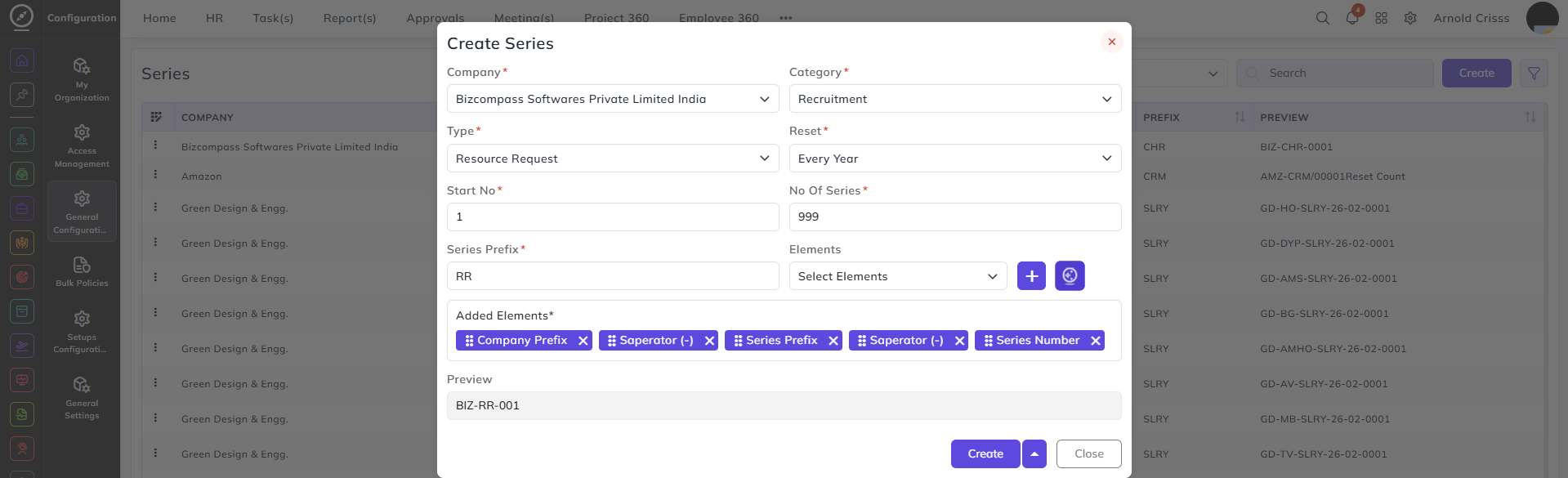
Create Series:
-
Select the Company.
-
Choose the Category for the series (i.e. Recruitment or Letter).
-
Select the Type for the series:
-
Resource Request (if you're generating a resource request)
-
Application (if you're adding a candidate directly without generating a resource request)
-
Agreement Letter, Appointment Letter, Offer Letter and Other Letters (if you're generating for letters)
-
-
Select how often the series number Resets.
-
Enter the Starting No. for the series.
-
Define the total No. Of Series entries to generate.
-
Enter a Series Prefix that will be used in the series identifier.
-
Select the Elements to include in the series identifier.
-
If you want, utilize the AI Series Generator (icon next to the "+" symbol) for automatic generation of series based on your configuration.
-
See a real-time Preview of the series identifier format based on the inputs.