Series (Support Ticket)
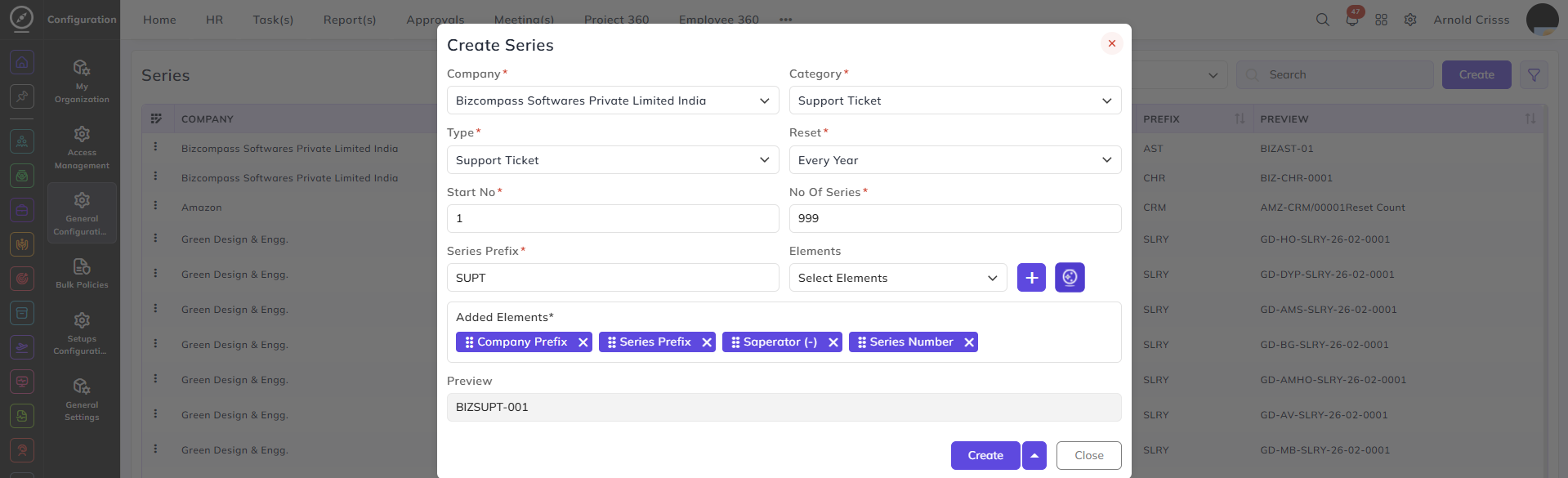
From here, you can create Series for Support Ticket which is necessary to create a Support Ticket.
This page assigns a unique and easily identifiable series number.
Create Series:
-
Select the Company.
-
Choose Support Ticket in the Category.
-
Select the Type for the series:
-
Support Ticket
-
BizCompass Support Ticket
-
-
Select how often the series number Resets.
-
Enter the Starting No. for the series.
-
Define the total No. Of Series entries to generate.
-
Enter a Series Prefix that will be used in the series identifier.
-
Select the Elements to include in the series identifier.
-
If you want, utilize the AI Series Generator (icon next to the "+" symbol) for automatic generation of series based on your configuration.
-
See a real-time Preview of the series identifier format based on the inputs.