
Support Categories
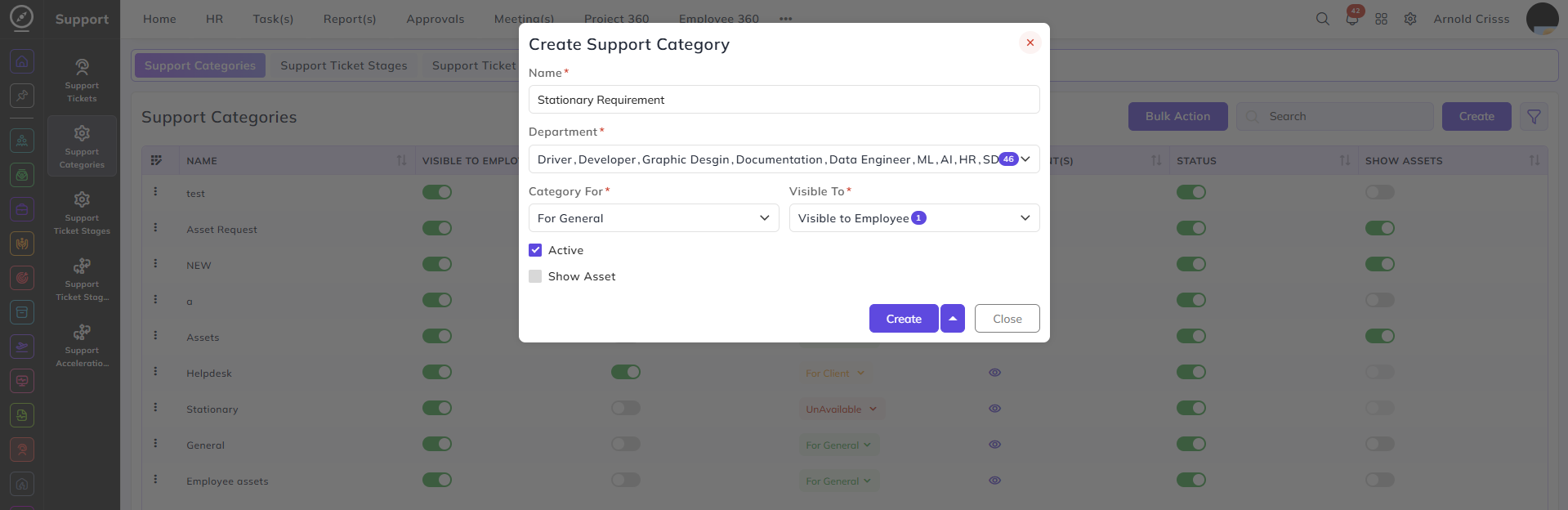
From this page, you can create Support Categories which are used to categorize your support requirements.
Name:
Enter a name to identify this support category — for example, Stationary Requirement or Helpdesk.
Department:
Select the department(s) this support category is applicable to. Multiple departments can be selected.
Category For:
Select who this category is intended for:
- For General — the category is for internal use across the organization.
- For Client — the category is for client-facing support tickets.
Visible To:
Select who can see this category when raising a support ticket. The options available depend on the Category For selection:
- When For General is selected — only Visible to Employee is available.
- When For Client is selected — both options are available and can be selected:
- Visible to Employee — the category is visible to employees
- Visible to Client — the category is visible to clients
Active:
Enable this to make the category available for selection when creating support tickets.
Show Asset:
Enable this to allow assets to be attached or linked when a support ticket is raised under this category.
With the Bulk Action feature, you can delete multiple support categories at once, streamlining the process.