
Support Categories
From this page, you can create Support Categories which are used to categorize your support requirements.
Name:
Enter a name to identify this support category — for example, Stationary Requirement or Helpdesk.
Department:
Select the department(s) this support category is applicable to. Multiple departments can be selected.
Category For:
Select who this category is intended for:
- For General — the category is for internal use across the organization.
- For Client — the category is for client-facing support tickets.
Visible To:
Select who can see this category when raising a support ticket. The options available depend on the Category For selection:
- When For General is selected — only Visible to Employee is available.
- When For Client is selected — both options are available and can be selected:
- Visible to Employee — the category is visible to employees
- Visible to Client — the category is visible to clients
Active:
Enable this to make the category available for selection when creating support tickets.
Show Asset:
Enable this to allow assets to be attached or linked when a support ticket is raised under this category.
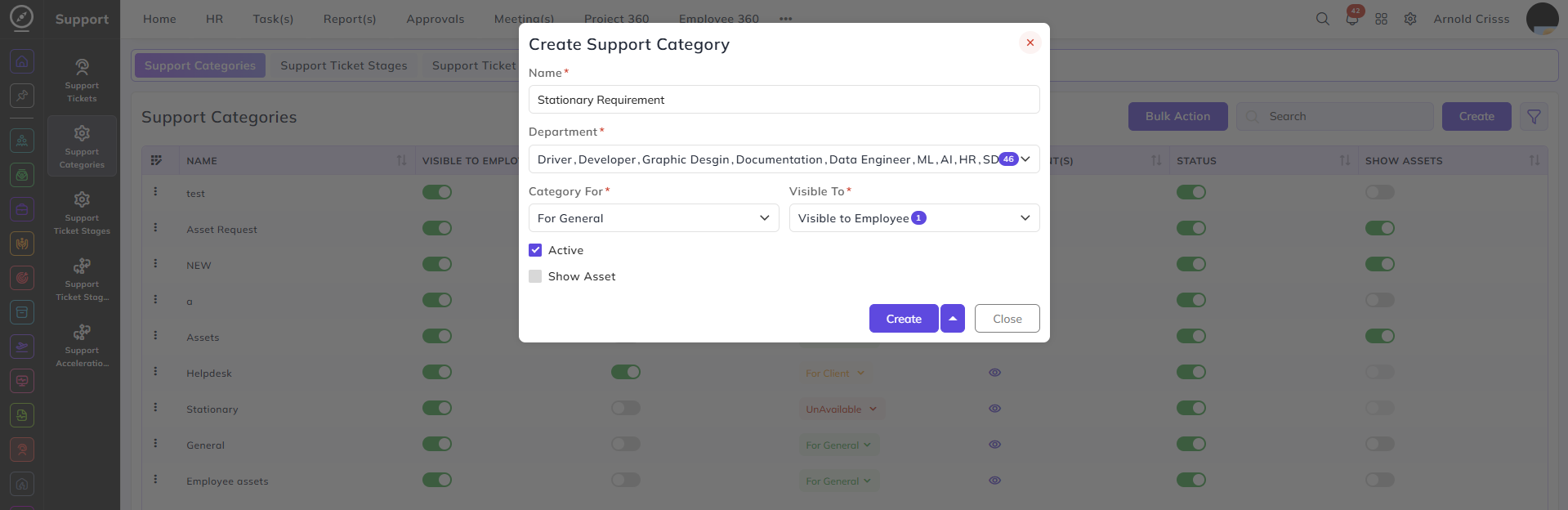
The Active Status, Show Assets, Category For, and Visible To flag options can be edited after creating the support category as well.
With the Bulk Action feature, you can delete multiple support categories at once, streamlining the process.