Letters
The Letters feature is used to create, manage, and issue various types of official letters for employees and customers. It centralizes all letter templates and generated documents, ensuring consistency, approval control, and easy distribution.
Letter Types:
The system supports multiple predefined letter categories, including:
-
Agreement Letter
-
Appointment Lettera
-
Offer Letter
-
Experience Letter
-
Termination Letter
-
Relieving Letter
-
Other Custom Letters
Each letter type can be configured separately based on organizational requirements.
Overview:
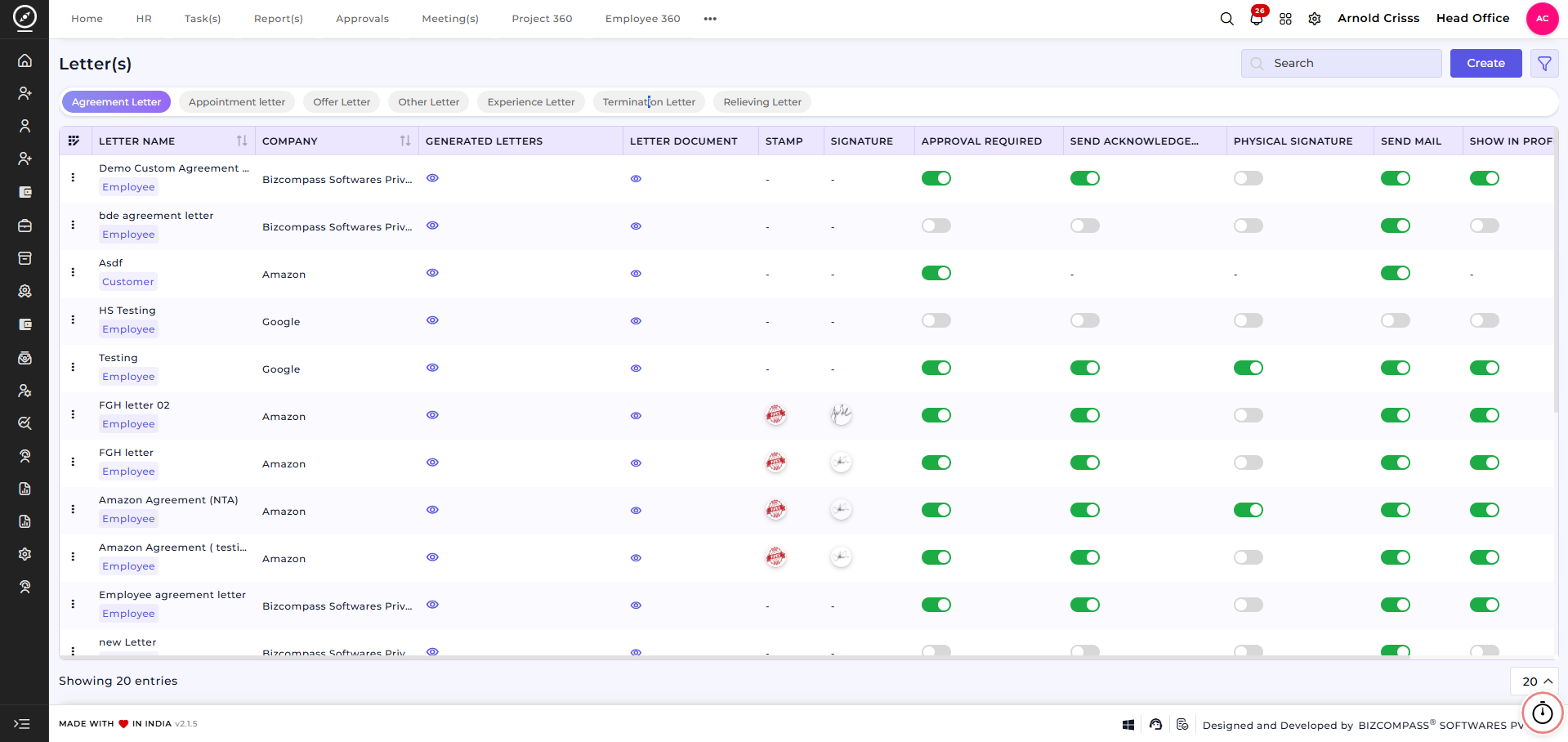
This section provides a complete view of all configured letters and their settings.
-
View the Letter Name and associated Company
-
Identify whether the letter is for an Employee or Customer
-
Access Generated Letters and Letter Documents
-
Configure options such as Stamp, Signature, and Physical Signature
-
Enable or disable Approval Required
-
Control Send Acknowledgement, Send Mail, and Show in Profile settings
-
Use search, filters, and actions to manage letters efficiently
This overview helps administrators quickly monitor and manage all letter-related configurations in one place.
Create Letter:
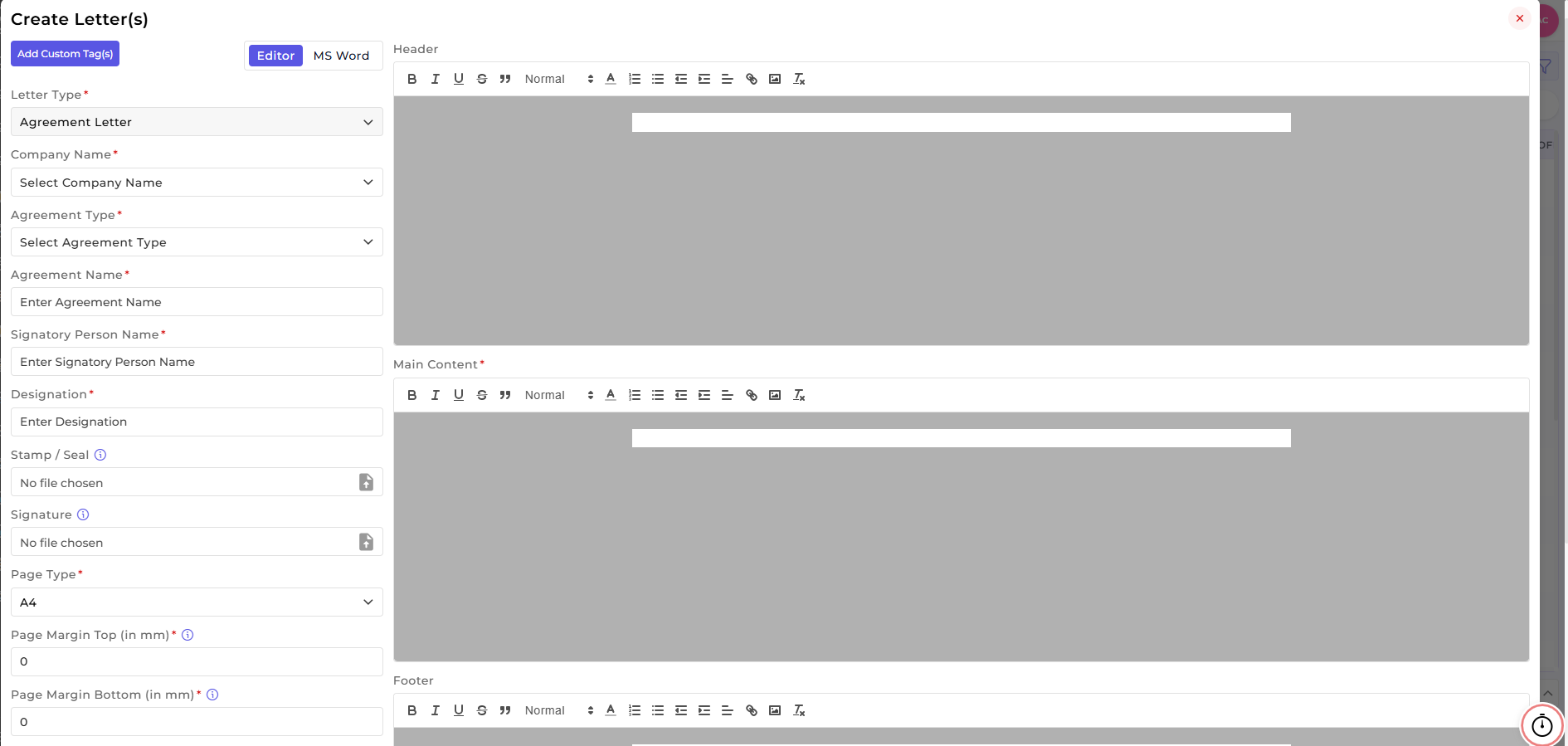
After clicking Create Letter, users can design and configure a new letter template with complete control over its content, format, and approval settings.
Basic Letter Configuration:
-
Select the Letter Type (Agreement, Offer, Appointment, etc.)
-
Choose the Company Name for which the letter is created
-
Define the Agreement Type (if applicable)
-
Enter a unique Agreement / Letter Name
-
Specify the Signatory Person Name and Designation
Letter Content Setup:
-
Design the Header, Main Content, and Footer using the built-in rich text editor
-
Switch between Editor and MS Word mode for flexible content creation
-
Use Custom Tags to dynamically populate employee or customer details
-
Apply text formatting such as font styles, alignment, lists, and links
Signature and Stamp Configuration:
-
Upload an official Stamp / Seal
-
Upload the authorized Signature
-
Enable or disable Physical Signature as required
Page Layout Settings:
-
Select the Page Type (e.g., A4)
-
Configure Top, Bottom, Left, and Right Margins (in mm)
-
Ensure proper alignment and print-ready formatting
Approval and Control Options:
-
Enable Approval Required before letter issuance
-
Control whether acknowledgment is mandatory
-
Define delivery behavior such as email sending and profile visibility

How this feature helps:
The Letters feature ensures standardized and compliant communication across the organization.
It helps HR and Admin teams to:
-
Maintain consistent letter formats and branding
-
Automate letter generation and approvals
-
Reduce manual documentation errors
-
Control visibility and delivery of official letters
Once a Letter is created, it can be used for:
-
Generating employee or customer documents
-
Managing approvals and acknowledgements
-
Sending letters digitally or maintaining physical copies
-
Storing letters securely in employee profiles
This ensures professional communication, compliance, and efficient document management throughout the employee lifecycle.
-