Comp-off Credit Approvals
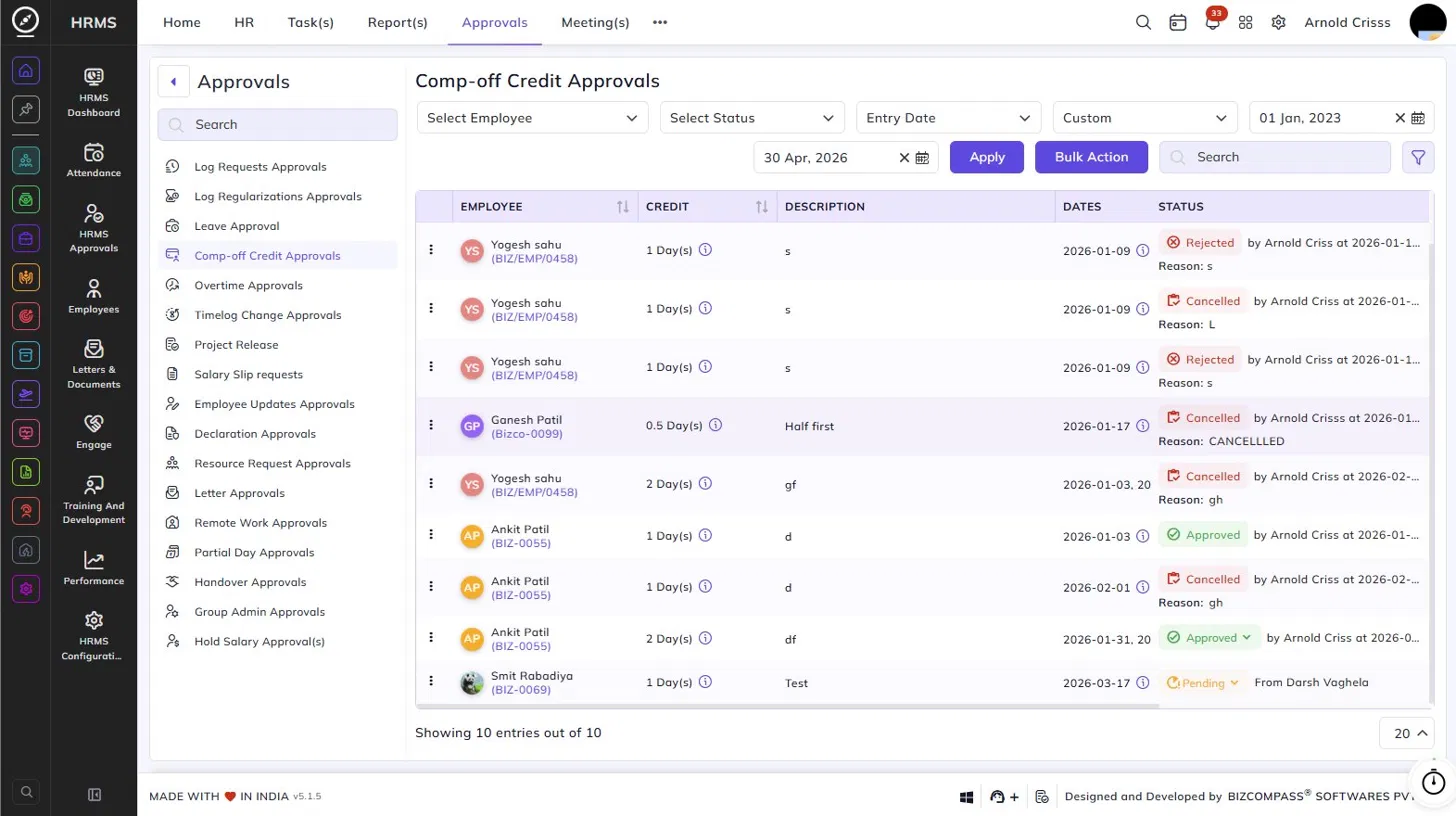
The Comp-off Credit Approvals page lists all comp-off credit requests submitted by employees for working on non-working days. To navigate here, go to Approvals->Comp-off Credit Approvals.
Use the Employee, Status, Entry Date type, and date range filters to narrow down the list. Click Apply to load the filtered results. Use Bulk Action to approve or reject multiple requests at once.
Table Columns:
Each comp-off credit request displays the following details:
- Employee – The employee's name and employee code.
- Credit – The number of days of comp-off credit being requested (e.g., 1 Day, 0.5 Day, 2 Days), along with an info icon to view additional details about the credit.
- Description – The description or reason provided by the employee for working on the non-working day.
- Dates – The date(s) for which the comp-off credit is being claimed, along with an info icon for more details.
- Attachment – Any supporting document attached by the employee, if applicable.
- History – Click the history icon to view the approval history for that request.
- Status – The current status of the request — Approved (with the approver's name and timestamp), Pending (with the source), Rejected (with the reason), or Cancelled (with the reason). Click the status dropdown on any pending entry to approve or reject it. For approved requests, the comp-off credit will be added to the employee's leave balance once approved.