Handover Approvals
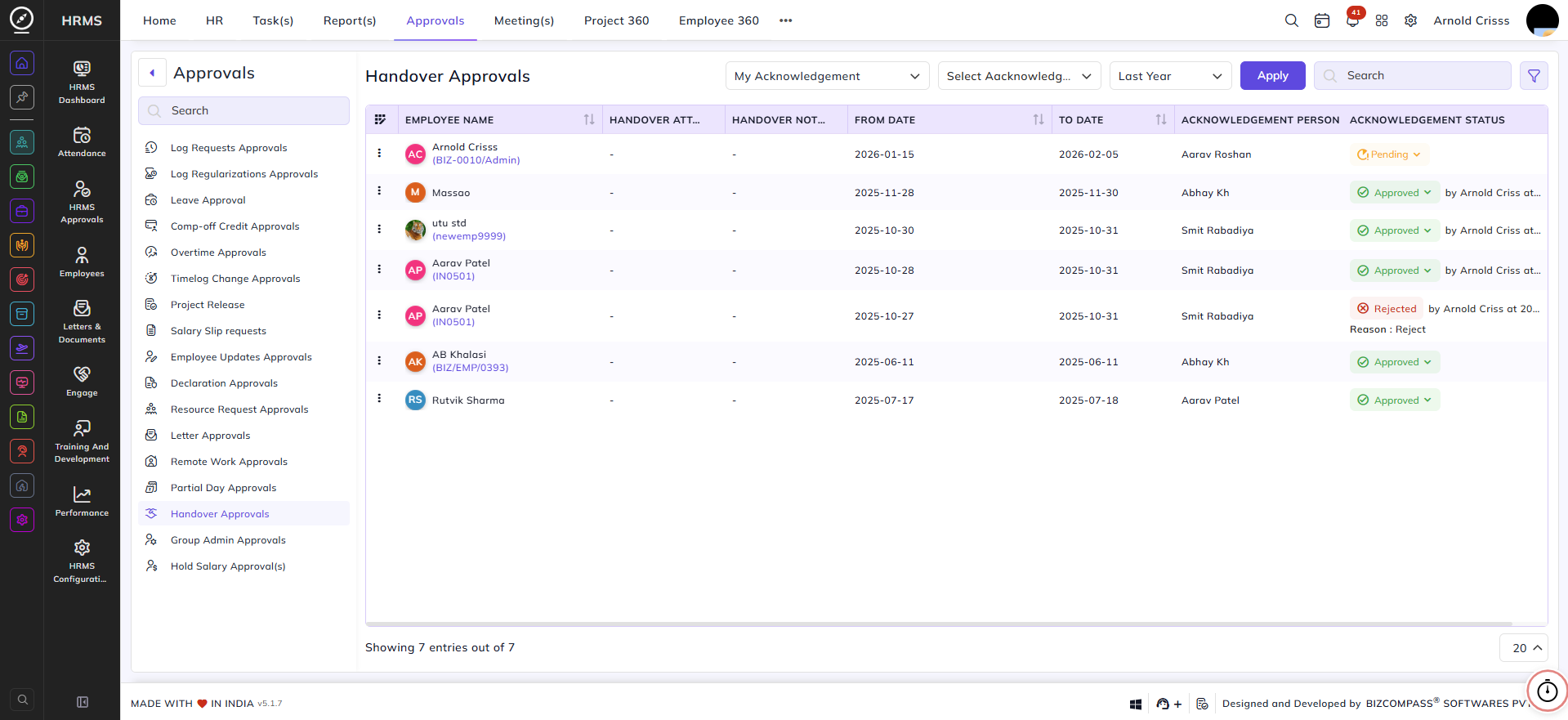
The Handover Approvals page lists all work handover requests that require acknowledgement or approval. Handover is part of the exit process — when an employee resigns, they are required to hand over their work and responsibilities before their last working day. To navigate here, go to Approvals->Handover Approvals.
Use the view toggle to switch between My Acknowledgement (handovers where the logged-in user is the acknowledgement person) and My Approval(s) (handovers where the logged-in user is the approver). Use the Acknowledgement Status, Date, and filter icon for additional filtering.
Use the view toggle to switch between My Acknowledgements and My Approvals.
- My Acknowledgements displays handover records where you have been selected as the collective handover recipient. These records show the employees who have assigned the handover to you.
- My Approvals displays handover records that require your acknowledgment, confirming that Person B has received the handover from Person A.
Table Columns:
Each handover entry displays the following details:
- Employee Name – The employee's name and employee code who submitted the handover.
- Handover Attachment – Any document attached to the handover, if available.
- Handover Note – Any note added to the handover.
- From Date – The start date of the handover period.
- To Date – The end date of the handover period.
- Acknowledgement Person – The person responsible for acknowledging the handover.
- Acknowledgement Status – The current status of the acknowledgement — Approved (with the approver's name and timestamp), Pending, or Rejected (with the reason). Click the status dropdown to approve or reject the handover directly from the list. Approved requests can also be cancelled from here.