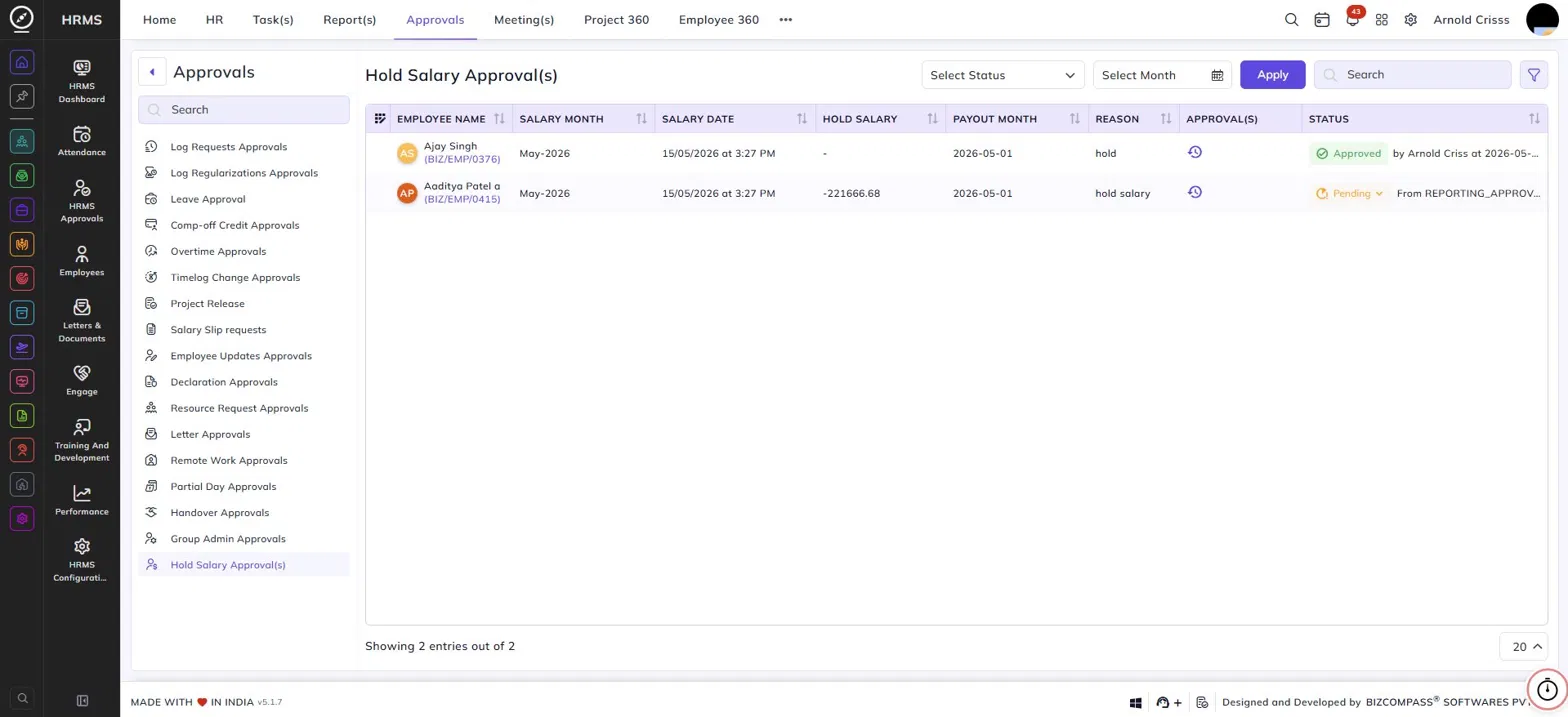
Hold Salary Approvals
The Hold Salary Approvals page lists all requests to hold an employee's salary during the payroll process. When a salary is put on hold from the Payroll Process page, it comes here for approval before the hold is applied. To navigate here, go to Approvals->Hold Salary Approval(s).
Use the Status and Month filters to narrow down the list.
Table Columns:
Each hold salary request displays the following details:
- Employee Name – The employee's name and employee code whose salary is being held.
- Salary Month – The month for which the salary is being held.
- Salary Date – The date and time the salary hold was initiated.
- Hold Salary – The amount being held, if applicable.
- Payout Month – The month in which the held salary is expected to be paid out.
- Reason – The reason provided for holding the salary.
- Approval(s) – Click the history icon to view the approval history for that request.
- Status – The current status — Approved (with the approver's name and timestamp) or Pending (with the source). Click the Pending dropdown to approve or reject the request directly from the list.